<!DOCTYPE html>
    <html lang="vi" xmlns="http://www.w3.org/1999/xhtml" prefix="og: http://ogp.me/ns#">
    <head>
<title>Hướng dẫn cấu hình VPN Site to Site Firewall Fortigate</title>
<meta name="description" content="Hướng dẫn cấu hình VPN Site to Site Firewall Fortigate - Savefile - Tin Tức -...">
<meta name="author" content="SOFTBIZ">
<meta name="copyright" content="SOFTBIZ [webmaster@test.softbiz.vn]">
<meta name="robots" content="noindex, follow">
<meta name="googlebot" content="noindex, follow">
<meta name="msnbot" content="noindex, follow">
<meta name="coccocbot" content="noindex, follow">
<meta name="generator" content="NukeViet v4.5">
<meta http-equiv="Content-Type" content="text/html; charset=utf-8">
<meta property="og:title" content="Hướng dẫn cấu hình VPN Site to Site Firewall Fortigate">
<meta property="og:type" content="website">
<meta property="og:description" content="Savefile - Tin Tức - https&#x3A;&#x002F;&#x002F;test.softbiz.vn&#x002F;vi&#x002F;news&#x002F;savefile&#x002F;tin-tuc&#x002F;huong-dan-cau-hinh-vpn-site-to-site-firewall-fortigate-19.html">
<meta property="og:site_name" content="SOFTBIZ">
<meta property="og:url" content="https://test.softbiz.vn/vi/news/savefile/tin-tuc/huong-dan-cau-hinh-vpn-site-to-site-firewall-fortigate-19.html">
<link rel="shortcut icon" href="https://test.softbiz.vn/uploads/banners/favicon.png">
<link rel="canonical" href="https://test.softbiz.vn/vi/news/savefile/tin-tuc/huong-dan-cau-hinh-vpn-site-to-site-firewall-fortigate-19.html">
<link rel="alternate" href="https://test.softbiz.vn/vi/news/rss/" title="Tin Tức" type="application/rss+xml">
<link rel="alternate" href="https://test.softbiz.vn/vi/news/rss/tin-tuc/" title="Tin Tức - TIN TỨC" type="application/rss+xml">
<link rel="alternate" href="https://test.softbiz.vn/vi/news/rss/thong-tin-phan-mem/" title="Tin Tức - Thông tin phần mềm" type="application/rss+xml">
<link rel="alternate" href="https://test.softbiz.vn/vi/news/rss/cong-nghe-moi/" title="Tin Tức - Công nghệ mới" type="application/rss+xml">
<link rel="alternate" href="https://test.softbiz.vn/vi/news/rss/giai-phap-8/" title="Tin Tức - Giải pháp" type="application/rss+xml">
<link rel="alternate" href="https://test.softbiz.vn/vi/news/rss/tai-lieu/" title="Tin Tức - TÀI LIỆU" type="application/rss+xml">
<link rel="alternate" href="https://test.softbiz.vn/vi/news/rss/giai-phap/" title="Tin Tức - GIẢI PHÁP" type="application/rss+xml">
<link rel="alternate" href="https://test.softbiz.vn/vi/news/rss/ung-dung/" title="Tin Tức - ỨNG DỤNG" type="application/rss+xml">
<link rel="preload" as="style" href="https://test.softbiz.vn/assets/css/font-awesome.min.css" type="text/css">
<link rel="preload" as="style" href="https://test.softbiz.vn/themes/Softbiz26/css/bootstrap.non-responsive.css" type="text/css">
<link rel="preload" as="style" href="https://test.softbiz.vn/themes/Softbiz26/css/style.css" type="text/css">
<link rel="preload" as="style" href="https://test.softbiz.vn/themes/Softbiz26/css/style.non-responsive.css" type="text/css">
<link rel="preload" as="style" href="https://test.softbiz.vn/themes/Softbiz26/css/news.css" type="text/css">
<link rel="preload" as="style" href="https://test.softbiz.vn/themes/Softbiz26/css/custom.css" type="text/css">
<link rel="preload" as="script" href="https://test.softbiz.vn/assets/js/jquery/jquery.min.js" type="text/javascript">
<link rel="preload" as="script" href="https://test.softbiz.vn/assets/js/language/vi.js" type="text/javascript">
<link rel="preload" as="script" href="https://test.softbiz.vn/assets/js/DOMPurify/purify3.js" type="text/javascript">
<link rel="preload" as="script" href="https://test.softbiz.vn/assets/js/global.js" type="text/javascript">
<link rel="preload" as="script" href="https://test.softbiz.vn/assets/js/site.js" type="text/javascript">
<link rel="preload" as="script" href="https://test.softbiz.vn/themes/Softbiz26/js/news.js" type="text/javascript">
<link rel="preload" as="script" href="https://test.softbiz.vn/themes/Softbiz26/js/main.js" type="text/javascript">
<link rel="preload" as="script" href="https://test.softbiz.vn/themes/Softbiz26/js/custom.js" type="text/javascript">
<link rel="preload" as="script" href="https://test.softbiz.vn/themes/Softbiz26/js/bootstrap.min.js" type="text/javascript">
<link rel="stylesheet" href="https://test.softbiz.vn/assets/css/font-awesome.min.css">
<link rel="stylesheet" href="https://test.softbiz.vn/themes/Softbiz26/css/bootstrap.non-responsive.css">
<link rel="stylesheet" href="https://test.softbiz.vn/themes/Softbiz26/css/style.css">
<link rel="stylesheet" href="https://test.softbiz.vn/themes/Softbiz26/css/style.non-responsive.css">
<link rel="StyleSheet" href="https://test.softbiz.vn/themes/Softbiz26/css/news.css">
<link rel="stylesheet" href="https://test.softbiz.vn/themes/Softbiz26/css/custom.css">
<style type="text/css">
	body{background: #fff;}
</style>
    </head>
    <body>
<div id="print">
	<div id="hd_print">
		<h2 class="pull-left">SOFTBIZ</h2>
		<p class="pull-right"><a title="SOFTBIZ" href="https://test.softbiz.vn/">https://test.softbiz.vn</a></p>
	</div>
	<div class="clear"></div>
	<hr />
	<div id="content">
		<h1>Hướng dẫn cấu hình VPN Site to Site Firewall Fortigate</h1>
		<ul class="list-inline">
			<li>Thứ sáu - 01/05/2026 05:04</li>
			<li class="hidden-print txtrequired"><em class="fa fa-print">&nbsp;</em><a title="In ra" href="javascript:;" onclick="window.print()">In ra</a></li>
			<li class="hidden-print txtrequired"><em class="fa fa-power-off">&nbsp;</em><a title="Đóng cửa sổ này" href="javascript:;" onclick="window.close()">Đóng cửa sổ này</a></li>
		</ul>
		<div class="clear"></div>
		<div id="hometext">
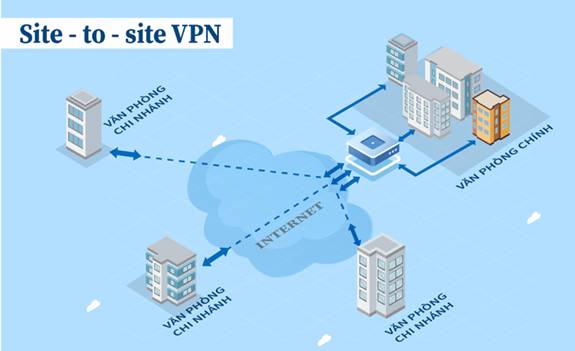
			VPN Client to Site là giao thức VPN cho phép người dùng có thể kết nối đến 1 mạng riêng từ xa thông qua 1 máy chủ VPN server. Thông thường, để sử dụng VPN client to site, thiết bị của người dùng sẽ cần cài đặt các phần mềm VPN client để kết nối đến máy chủ VPN server
		</div>
				<div class="imghome">
			<img alt="Hướng dẫn cấu hình VPN Site to Site Firewall Fortigate" src="https://test.softbiz.vn/uploads/news/2026_05/image_7.jpeg" width="460" class="img-thumbnail" />
		</div>
		<div class="clear"></div>
		<div id="bodytext" class="clearfix">
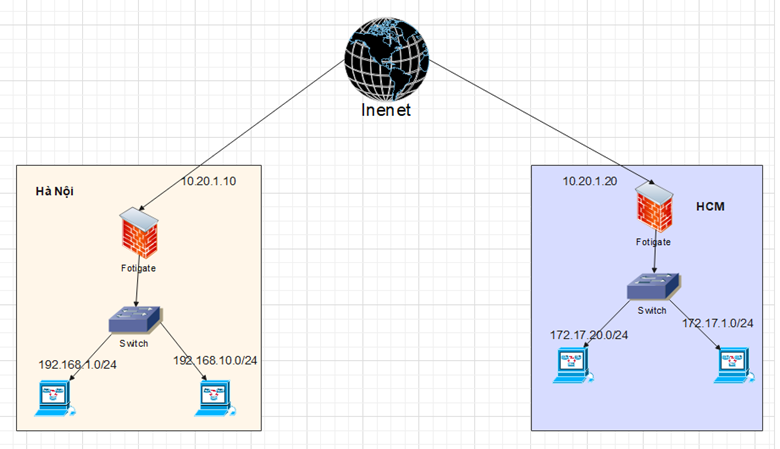
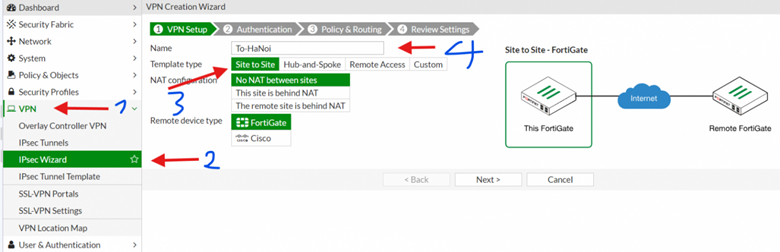
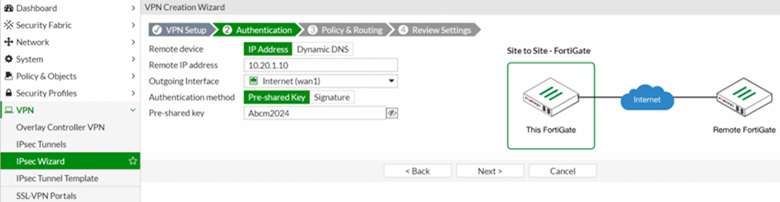
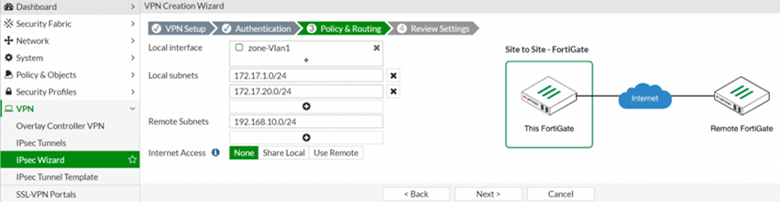
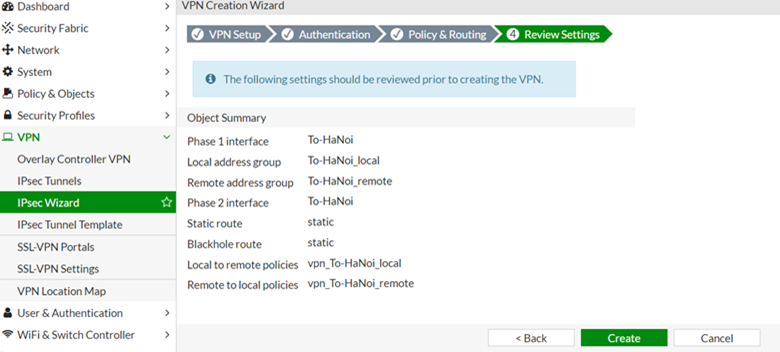
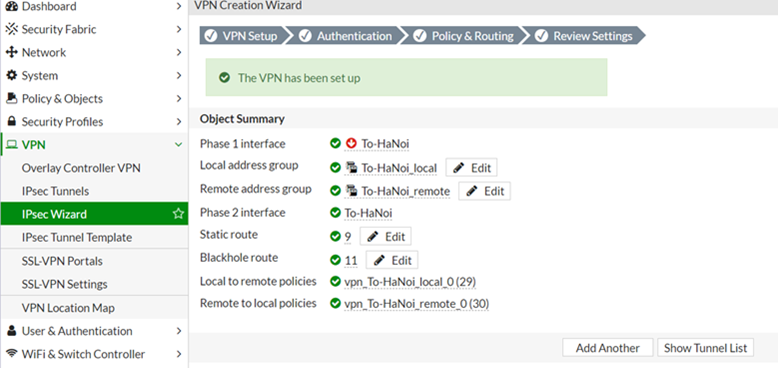
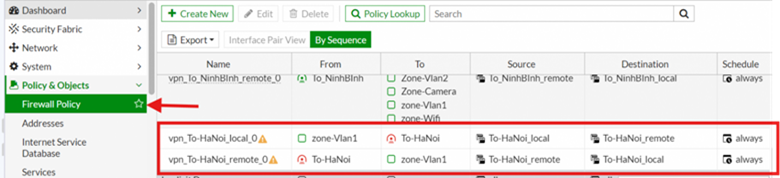
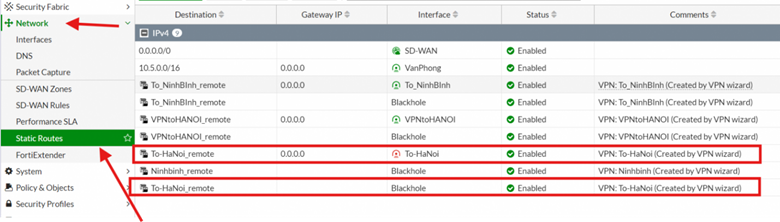
			<p style="background-color:white;line-height:20.4pt;text-align:left;" align="left"><span style="color:rgb(51,51,51);font-family:Roboto;font-size:10.5pt;"><img src="https://test.softbiz.vn/uploads/news/2026_05/image.png" width="624" height="359" v:shapes="Picture_x0020_15" uploadprocessed="true" /></span></p><p style="background-color:white;line-height:20.4pt;margin-bottom:11.25pt;text-align:left;" align="left"><br /><span style="background-color:white;color:rgb(51,51,51);font-family:Roboto;font-size:10.5pt;">Chúng ta sử dụng mô hình đơn giản gồm có 2 site, site&nbsp;<strong>Hà nội và HCM:</strong></span></p><ol><li class="ck-list-marker-font-size ck-list-marker-font-family" style="--ck-content-list-marker-font-family:Roboto;--ck-content-list-marker-font-size:10.5pt;background-color:white;color:rgb(51, 51, 51);line-height:20.4pt;margin-bottom:11.25pt;tab-stops:list 36.0pt;" data-list-item-id="ebe21e02fddec9b46190e9901d8e83580"><span style="background-color:white;font-family:Roboto;font-size:10.5pt;">Site Hà nội bao gồm :</span></li></ol><ul style="list-style-type:disc;"><li class="ck-list-marker-font-size ck-list-marker-font-family" style="--ck-content-list-marker-font-family:Roboto;--ck-content-list-marker-font-size:10.5pt;background-color:white;color:rgb(51, 51, 51);line-height:20.4pt;margin-bottom:11.25pt;tab-stops:list 36.0pt;" data-list-item-id="eaa838ff46a8628340075cc66a4352378"><span style="background-color:white;font-family:Roboto;font-size:10.5pt;">Dải IP local gồm&nbsp;<strong>192.168.1.0/24</strong>&nbsp;và&nbsp;<strong>192.168.10.0/24</strong>&nbsp;có thể thêm nhiều dải tương tự.</span></li><li class="ck-list-marker-font-size ck-list-marker-font-family" style="--ck-content-list-marker-font-family:Roboto;--ck-content-list-marker-font-size:10.5pt;background-color:white;color:rgb(51, 51, 51);line-height:20.4pt;margin-bottom:11.25pt;tab-stops:list 36.0pt;" data-list-item-id="e873a6a8c7645d66f4dd6f68643d6e060"><span style="background-color:white;font-family:Roboto;font-size:10.5pt;">IP địa chỉ&nbsp;wan&nbsp;<strong>10.20.1.10</strong>,</span></li></ul><ol><li class="ck-list-marker-font-size ck-list-marker-font-family" style="--ck-content-list-marker-font-family:Roboto;--ck-content-list-marker-font-size:10.5pt;background-color:white;color:rgb(51, 51, 51);line-height:20.4pt;margin-bottom:11.25pt;tab-stops:list 36.0pt;" data-list-item-id="e3ae3833c95347d3a59878f64173b0d22"><span style="background-color:white;font-family:Roboto;font-size:10.5pt;">Site&nbsp;<strong>HCM&nbsp;</strong>bao gồm:</span></li></ol><ul style="list-style-type:disc;"><li class="ck-list-marker-font-size ck-list-marker-font-family" style="--ck-content-list-marker-font-family:Roboto;--ck-content-list-marker-font-size:10.5pt;background-color:white;color:rgb(51, 51, 51);line-height:20.4pt;margin-bottom:11.25pt;tab-stops:list 36.0pt;" data-list-item-id="ed79b30f1e21df56b753e55a56dc8fc60"><span style="background-color:white;font-family:Roboto;font-size:10.5pt;">Dải IP local là&nbsp;<strong>172.17.20.0/24</strong>&nbsp;và&nbsp;<strong>172.17.20.0/24</strong></span></li><li class="ck-list-marker-font-size ck-list-marker-font-family" style="--ck-content-list-marker-font-family:Roboto;--ck-content-list-marker-font-size:10.5pt;background-color:white;color:rgb(51, 51, 51);line-height:20.4pt;margin-bottom:11.25pt;tab-stops:list 36.0pt;" data-list-item-id="e94d3cc0eac9dd4beaba3c1f5649ba627"><span style="background-color:white;font-family:Roboto;font-size:10.5pt;">IP wan là&nbsp;10.20.1.20</span></li></ul><p style="background-color:white;line-height:20.4pt;margin-bottom:11.25pt;text-align:left;" align="left"><span style="background-color:white;color:rgb(51,51,51);font-family:Roboto;font-size:10.5pt;">Lưu ý:&nbsp;Cả 2 site đều sử dụng firewall Fortigate. Nếu site remote sử dụng các thiết bị hãng khác như Cisco, Juniper, Palo Alto, Sophos, Sonicwall... thì các bạn vẫn làm tương tự, chỉ cần thiết lập đúng các thông số VPN là được.</span><br /><span style="background-color:white;color:rgb(51,51,51);font-family:Roboto;font-size:10.5pt;">Chúng ta sẽ cấu hình 1 VPN tunnel giữa&nbsp;Hà Nội&nbsp;và HCM để các máy tính giữa 2 site có thể ping được nhau.</span><br /><span style="background-color:white;color:rgb(51,51,51);font-family:Roboto;font-size:10.5pt;">Trong bài này chúng ta sẽ sử dụng&nbsp;<strong>IPSec Wizard</strong>&nbsp;để tạo tunnel, sau đó convert tunnel này sang Custom để thay đổi các thông số VPN. Làm theo cách này chúng ta sẽ không cần tạo policy, route cho VPN, mà các cấu hình này sẽ được tạo tự động.</span><br /><span style="background-color:white;color:rgb(51,51,51);font-family:Roboto;font-size:10.5pt;"><strong>Cấu hình VPN Site to Site Tunnel</strong></span><br /><span style="background-color:white;color:rgb(51,51,51);font-family:Roboto;font-size:10.5pt;">Trên giao diện web của firewall&nbsp;<strong>HCM</strong>, truy cập vào menu:&nbsp;<strong>VPN</strong>&nbsp;&gt;&nbsp;<strong>Ipsec Wizard</strong>, tại đây các bạn thiết lập các thông số cơ bản cho VPN.</span></p><ul style="list-style-type:disc;"><li class="ck-list-marker-font-size ck-list-marker-font-family" style="--ck-content-list-marker-font-family:Roboto;--ck-content-list-marker-font-size:10.5pt;background-color:white;color:rgb(51, 51, 51);line-height:20.4pt;tab-stops:list 36.0pt;text-align:left;" data-list-item-id="e22396d87deb473a1ed2ed46bcb1317de"><span style="background-color:white;font-family:Roboto;font-size:10.5pt;"><strong>Name</strong>: đặt tên cho VPN tunnel&nbsp;ở đây ta đặt là : To-HaNoi</span></li><li class="ck-list-marker-font-size ck-list-marker-font-family" style="--ck-content-list-marker-font-family:Roboto;--ck-content-list-marker-font-size:10.5pt;background-color:white;color:rgb(51, 51, 51);line-height:20.4pt;tab-stops:list 36.0pt;text-align:left;" data-list-item-id="ea4ff1db5655bb87a6a6a019cdf8816dc"><span style="background-color:white;font-family:Roboto;font-size:10.5pt;"><strong>Template type</strong>: chọn&nbsp;<strong>Site to Site.</strong></span></li><li class="ck-list-marker-font-size ck-list-marker-font-family" style="--ck-content-list-marker-font-family:Roboto;--ck-content-list-marker-font-size:10.5pt;background-color:white;color:rgb(51, 51, 51);line-height:20.4pt;tab-stops:list 36.0pt;text-align:left;" data-list-item-id="e7f39ccef229e3759f5b06963503ce0e7"><span style="background-color:white;font-family:Roboto;font-size:10.5pt;"><strong>NAT configuration</strong>: chọn&nbsp;<strong>No NAT between sites</strong>. Nếu phía trước Firewall có 1 thiết bị router chạy NAT thì các bạn chọn mục này là&nbsp;<strong>This site is behind NAT</strong>, sau đó các bạn cần mở 2 Port&nbsp;<strong>UDP 500</strong>&nbsp;và&nbsp;<strong>UDP 4500</strong>&nbsp;trên thiết bị NAT.</span></li><li class="ck-list-marker-font-size ck-list-marker-font-family" style="--ck-content-list-marker-font-family:Roboto;--ck-content-list-marker-font-size:10.5pt;background-color:white;color:rgb(51, 51, 51);line-height:20.4pt;tab-stops:list 36.0pt;text-align:left;" data-list-item-id="ee99a2b77e49a2a0a9883114dabf17c80"><span style="background-color:white;font-family:Roboto;font-size:10.5pt;"><strong>Remote Device Type</strong>: các bạn vẫn chọn&nbsp;<strong>Fortigate</strong>&nbsp;ở mục này.</span></li></ul><p style="background-color:white;line-height:20.4pt;text-align:left;" align="left"><span style="color:rgb(51,51,51);font-family:Roboto;font-size:10.5pt;"><img src="https://test.softbiz.vn/uploads/news/2026_05/image_3.png" width="624" height="202" v:shapes="Picture_x0020_14" uploadprocessed="true" /></span></p><p style="background-color:white;line-height:20.4pt;margin-bottom:11.25pt;text-align:left;" align="left"><br /><span style="background-color:white;color:rgb(51,51,51);font-family:Roboto;font-size:10.5pt;">Nhấn&nbsp;<strong>Next</strong>, sau đó thiết lập các thông số&nbsp;<strong>Authentication</strong>&nbsp;cho VPN Tunnel:</span></p><ul style="list-style-type:disc;"><li class="ck-list-marker-font-size ck-list-marker-font-family" style="--ck-content-list-marker-font-family:Roboto;--ck-content-list-marker-font-size:10.5pt;background-color:white;color:rgb(51, 51, 51);line-height:20.4pt;tab-stops:list 36.0pt;text-align:left;" data-list-item-id="e137db848bbee1f6f83a4029eb053d473"><span style="background-color:white;font-family:Roboto;font-size:10.5pt;"><strong>Remote Device</strong>: chọn&nbsp;<strong>IP Address</strong>&nbsp;nếu IP Wan là IP tĩnh. Nếu IP động các bạn có thể cấu hình DDNS và chọn mục này là&nbsp;<strong>Dynamic DNS</strong>.</span></li><li class="ck-list-marker-font-size ck-list-marker-font-family" style="--ck-content-list-marker-font-family:Roboto;--ck-content-list-marker-font-size:10.5pt;background-color:white;color:rgb(51, 51, 51);line-height:20.4pt;tab-stops:list 36.0pt;text-align:left;" data-list-item-id="e487a13ad42344bceec08d471eda90ee2"><span style="background-color:white;font-family:Roboto;font-size:10.5pt;"><strong>Remote IP Address</strong>: nhập địa chỉ IP WAN của site remote, trong mô hình của chúng ta là&nbsp;<strong>10.20.1.10&nbsp;</strong>chính là IP site Hà Nội.</span></li><li class="ck-list-marker-font-size ck-list-marker-font-family" style="--ck-content-list-marker-font-family:Roboto;--ck-content-list-marker-font-size:10.5pt;background-color:white;color:rgb(51, 51, 51);line-height:20.4pt;tab-stops:list 36.0pt;text-align:left;" data-list-item-id="ede8c76af3e09d2c6169a60332dcdfdde"><span style="background-color:white;font-family:Roboto;font-size:10.5pt;"><strong>Outgoing Interface</strong>: chọn cổng WAN&nbsp;muốn kết nối đến</span></li><li class="ck-list-marker-font-size ck-list-marker-font-family" style="--ck-content-list-marker-font-family:Roboto;--ck-content-list-marker-font-size:10.5pt;background-color:white;color:rgb(51, 51, 51);line-height:20.4pt;tab-stops:list 36.0pt;text-align:left;" data-list-item-id="e15afd2b79e5f0786bfe04cd3892067f6"><span style="background-color:white;font-family:Roboto;font-size:10.5pt;"><strong>Authentication method</strong>: chọn phương thức xác thực, trong trường hợp của chúng ta là&nbsp;<strong>Pre-shared Key</strong>.&nbsp;Nhập thông tin khóa kết nối ( khóa này nhập giống site bên Hà nội)</span></li></ul><p style="background-color:white;line-height:20.4pt;text-align:left;" align="left"><span style="color:rgb(51,51,51);font-family:Roboto;font-size:10.5pt;"><img src="https://test.softbiz.vn/uploads/news/2026_05/image_6.png" width="624" height="162" v:shapes="Picture_x0020_13" uploadprocessed="true" /></span></p><p style="background-color:white;line-height:20.4pt;margin-bottom:11.25pt;text-align:left;" align="left"><br /><span style="background-color:white;color:rgb(51,51,51);font-family:Roboto;font-size:10.5pt;">Nhấn&nbsp;<strong>Next</strong>, thiết lập các dải mạng của 2 site cho VPN:</span></p><ul style="list-style-type:disc;"><li class="ck-list-marker-font-size ck-list-marker-font-family" style="--ck-content-list-marker-font-family:Roboto;--ck-content-list-marker-font-size:10.5pt;background-color:white;color:rgb(51, 51, 51);line-height:20.4pt;tab-stops:list 36.0pt;text-align:left;" data-list-item-id="e05e9119d659a384aaed000fdfaf72590"><span style="background-color:white;font-family:Roboto;font-size:10.5pt;"><strong>Local Interface</strong>: chọn cổng mạng kết nối xuống dải mạng LAN đang VPN.</span></li><li class="ck-list-marker-font-size ck-list-marker-font-family" style="--ck-content-list-marker-font-family:Roboto;--ck-content-list-marker-font-size:10.5pt;background-color:white;color:rgb(51, 51, 51);line-height:20.4pt;tab-stops:list 36.0pt;text-align:left;" data-list-item-id="e13a72e390fb4b766357d44f0c2a33ad2"><span style="background-color:white;font-family:Roboto;font-size:10.5pt;"><strong>Local Subnets</strong>: nhập dải mạng local, trong mô hình của chúng ta là&nbsp;<strong>172.17.1.0/24</strong>&nbsp;và&nbsp;<strong>172.17.20.0/24</strong>.&nbsp;Nếu có nhiều dải mạng, các bạn có thể nhấn dấu&nbsp;<strong>+</strong>&nbsp;và nhập thêm các VLAN khác vào.</span></li><li class="ck-list-marker-font-size ck-list-marker-font-family" style="--ck-content-list-marker-font-family:Roboto;--ck-content-list-marker-font-size:10.5pt;background-color:white;color:rgb(51, 51, 51);line-height:20.4pt;tab-stops:list 36.0pt;text-align:left;" data-list-item-id="ee560b0392a30b28a7b0600ee21e86d32"><span style="background-color:white;font-family:Roboto;font-size:10.5pt;"><strong>Remote Subnets</strong>: nhập dải mạng LAN của site remote. ở đây nhập&nbsp;<strong>192.168.10.0/24</strong>&nbsp;là giải mạng lan của site Hà nội</span></li><li class="ck-list-marker-font-size ck-list-marker-font-family" style="--ck-content-list-marker-font-family:Roboto;--ck-content-list-marker-font-size:10.5pt;background-color:white;color:rgb(51, 51, 51);line-height:20.4pt;margin-bottom:11.25pt;tab-stops:list 36.0pt;" data-list-item-id="e57fe9cdb684bf2136340250d0b57d1d4"><span style="background-color:white;font-family:Roboto;font-size:10.5pt;"><strong>Internet Access</strong>: mục này chúng ta có 3 tùy chọn. Tùy chọn&nbsp;<strong>None</strong>&nbsp;thì chỉ có traffic giữa các dải LAN của VPN mới đi qua tunnel, còn traffic truy cập internet sẽ không phụ thuộc vào VPN. Tùy chọn&nbsp;<strong>Share Local</strong>&nbsp;thì traffic truy cập internet của site&nbsp;Hà Nội&nbsp;sẽ đi qua VPN tunnel và sử dụng đường Wan của site&nbsp;HCM&nbsp;để ra internet. Tương tự với tùy chọn&nbsp;<strong>Use Remote</strong>&nbsp;sẽ sử dụng đường WAN của site remote.</span></li></ul><p style="background-color:white;line-height:20.4pt;text-align:left;" align="left"><span style="color:rgb(51,51,51);font-family:Roboto;font-size:10.5pt;"><img src="https://test.softbiz.vn/uploads/news/2026_05/image_1.png" width="624" height="162" v:shapes="Picture_x0020_12" uploadprocessed="true" /></span></p><p style="background-color:white;line-height:20.4pt;margin-bottom:11.25pt;text-align:left;" align="left"><br /><span style="background-color:white;color:rgb(51,51,51);font-family:Roboto;font-size:10.5pt;">Nhấn&nbsp;<strong>Next</strong>, sau đó nhấn&nbsp;<strong>Create</strong>&nbsp;để tạo VPN Tunnel.</span><br /><span style="color:rgb(51,51,51);font-family:Roboto;font-size:10.5pt;">&nbsp;</span></p><p style="background-color:white;line-height:20.4pt;text-align:left;" align="left"><span style="color:rgb(51,51,51);font-family:Roboto;font-size:10.5pt;"><img src="https://test.softbiz.vn/uploads/news/2026_05/image_2.png" width="624" height="282" v:shapes="Picture_x0020_11" uploadprocessed="true" /></span></p><p style="background-color:white;line-height:20.4pt;margin-bottom:11.25pt;text-align:left;" align="left"><br /><span style="color:rgb(51,51,51);font-family:Roboto;font-size:10.5pt;">&nbsp;</span></p><p style="background-color:white;line-height:20.4pt;text-align:left;" align="left"><span style="color:rgb(51,51,51);font-family:Roboto;font-size:10.5pt;"><img src="https://test.softbiz.vn/uploads/news/2026_05/image_4.png" width="622" height="294" v:shapes="Picture_x0020_10" uploadprocessed="true" /></span></p><p style="background-color:white;line-height:20.4pt;margin-bottom:11.25pt;text-align:left;" align="left"><br /><span style="background-color:white;color:rgb(51,51,51);font-family:Roboto;font-size:10.5pt;">Sau khi tạo VPN tunnel bằng wizard, vào phần&nbsp;<strong>Firewall Policy</strong>, chúng ta sẽ thấy Fortigate đã tạo sẵn 2 Policy cho VPN tunnel. Nếu các bạn muốn thay đổi chính sách thì chỉ cần edit các policy này là xong. Nếu cấu hình Custom ngay từ đầu, chúng ta sẽ phải tự tạo các Policy này.</span><br /><span style="color:rgb(51,51,51);font-family:Roboto;font-size:10.5pt;">&nbsp;</span></p><p style="background-color:white;line-height:20.4pt;text-align:left;" align="left"><span style="color:rgb(51,51,51);font-family:Roboto;font-size:10.5pt;"><img src="https://test.softbiz.vn/uploads/news/2026_05/image_5.png" width="624" height="142" v:shapes="Picture_x0020_9" uploadprocessed="true" /></span></p><p style="background-color:white;line-height:20.4pt;margin-bottom:11.25pt;text-align:left;" align="left"><br /><span style="background-color:white;color:rgb(51,51,51);font-family:Roboto;font-size:10.5pt;">Static Route cũng được tạo tự động cho VPN Tunnel.</span><br /><span style="color:rgb(51,51,51);font-family:Roboto;font-size:10.5pt;">&nbsp;</span></p><p style="background-color:white;line-height:20.4pt;text-align:left;" align="left"><span style="color:rgb(51,51,51);font-family:Roboto;font-size:10.5pt;"><img src="https://test.softbiz.vn/uploads/news/2026_05/image_7.png" width="624" height="178" v:shapes="Picture_x0020_8" uploadprocessed="true" /></span></p><p style="background-color:white;line-height:20.4pt;margin-bottom:11.25pt;text-align:left;" align="left"><br /><span style="background-color:white;color:rgb(51,51,51);font-family:Roboto;font-size:10.5pt;">Tương tự chúng ta sẽ cấu hình 1 VPN tunnel trên Firewall&nbsp;Hà Nội, các thông số của VPN Tunnel chúng ta cần thiết lập tương tự như Site&nbsp;HCM.</span></p><p>&nbsp;</p>
		</div>
				<div id="author">
						<p>
				<strong>Tác giả:</strong>
				<a href="https://test.softbiz.vn/vi/news/author/admin/">admin</a>
			</p>
		</div>
	</div>
	<div id="footer" class="clearfix">
		<div id="url">
			<strong>URL của bản tin này: </strong><a href="https://test.softbiz.vn/vi/news/savefile/tin-tuc/huong-dan-cau-hinh-vpn-site-to-site-firewall-fortigate-19.html" title="Hướng dẫn cấu hình VPN Site to Site Firewall Fortigate">https://test.softbiz.vn/vi/news/savefile/tin-tuc/huong-dan-cau-hinh-vpn-site-to-site-firewall-fortigate-19.html</a>

		</div>
		<div class="clear"></div>
		<div class="copyright">
			&copy; SOFTBIZ
		</div>
		<div id="contact">
			<a href="mailto:webmaster@test.softbiz.vn">webmaster@test.softbiz.vn</a>
		</div>
	</div>
</div>
        <div id="timeoutsess" class="chromeframe">
            Bạn đã không sử dụng Site, <a onclick="timeoutsesscancel();" href="https://test.softbiz.vn/#">Bấm vào đây để duy trì trạng thái đăng nhập</a>. Thời gian chờ: <span id="secField"> 60 </span> giây
        </div>
        <div id="openidResult" class="nv-alert" style="display:none"></div>
        <div id="openidBt" data-result="" data-redirect=""></div>
<script src="https://test.softbiz.vn/assets/js/jquery/jquery.min.js"></script>
<script>var nv_base_siteurl="/",nv_lang_data="vi",nv_lang_interface="vi",nv_name_variable="nv",nv_fc_variable="op",nv_lang_variable="language",nv_module_name="news",nv_func_name="savefile",nv_is_user=0, nv_my_ofs=-4,nv_my_abbr="EDT",nv_cookie_prefix="nv4",nv_check_pass_mstime=1738000,nv_area_admin=0,nv_safemode=0,theme_responsive=0,nv_recaptcha_ver=2,nv_recaptcha_sitekey="",nv_recaptcha_type="image",XSSsanitize=1;</script>
<script src="https://test.softbiz.vn/assets/js/language/vi.js"></script>
<script src="https://test.softbiz.vn/assets/js/DOMPurify/purify3.js"></script>
<script src="https://test.softbiz.vn/assets/js/global.js"></script>
<script src="https://test.softbiz.vn/assets/js/site.js"></script>
<script src="https://test.softbiz.vn/themes/Softbiz26/js/news.js"></script>
<script src="https://test.softbiz.vn/themes/Softbiz26/js/main.js"></script>
<script src="https://test.softbiz.vn/themes/Softbiz26/js/custom.js"></script>
<script type="application/ld+json">
        {
            "@context": "https://schema.org",
            "@type": "Organization",
            "url": "https://test.softbiz.vn",
            "logo": "https://test.softbiz.vn/uploads/banners/banner6.png"
        }
        </script>
<script src="https://test.softbiz.vn/themes/Softbiz26/js/bootstrap.min.js"></script>
</body>
</html>