<!DOCTYPE html>
    <html lang="vi" xmlns="http://www.w3.org/1999/xhtml" prefix="og: http://ogp.me/ns#">
    <head>
<title>Cách sử dụng lệnh ping, traceroute&#x002F;tracert và pathping</title>
<meta name="description" content="Cách sử dụng lệnh ping, traceroute&#x002F;tracert và pathping - Savefile - Tin Tức -...">
<meta name="author" content="SOFTBIZ">
<meta name="copyright" content="SOFTBIZ [webmaster@test.softbiz.vn]">
<meta name="robots" content="noindex, follow">
<meta name="googlebot" content="noindex, follow">
<meta name="msnbot" content="noindex, follow">
<meta name="coccocbot" content="noindex, follow">
<meta name="generator" content="NukeViet v4.5">
<meta http-equiv="Content-Type" content="text/html; charset=utf-8">
<meta property="og:title" content="Cách sử dụng lệnh ping, traceroute&#x002F;tracert và pathping">
<meta property="og:type" content="website">
<meta property="og:description" content="Savefile - Tin Tức - https&#x3A;&#x002F;&#x002F;test.softbiz.vn&#x002F;vi&#x002F;news&#x002F;savefile&#x002F;tin-tuc&#x002F;cach-su-dung-lenh-ping-traceroute-tracert-va-pathping-20.html">
<meta property="og:site_name" content="SOFTBIZ">
<meta property="og:url" content="https://test.softbiz.vn/vi/news/savefile/tin-tuc/cach-su-dung-lenh-ping-traceroute-tracert-va-pathping-20.html">
<link rel="shortcut icon" href="https://test.softbiz.vn/uploads/banners/favicon.png">
<link rel="canonical" href="https://test.softbiz.vn/vi/news/savefile/tin-tuc/cach-su-dung-lenh-ping-traceroute-tracert-va-pathping-20.html">
<link rel="alternate" href="https://test.softbiz.vn/vi/news/rss/" title="Tin Tức" type="application/rss+xml">
<link rel="alternate" href="https://test.softbiz.vn/vi/news/rss/tin-tuc/" title="Tin Tức - TIN TỨC" type="application/rss+xml">
<link rel="alternate" href="https://test.softbiz.vn/vi/news/rss/thong-tin-phan-mem/" title="Tin Tức - Thông tin phần mềm" type="application/rss+xml">
<link rel="alternate" href="https://test.softbiz.vn/vi/news/rss/cong-nghe-moi/" title="Tin Tức - Công nghệ mới" type="application/rss+xml">
<link rel="alternate" href="https://test.softbiz.vn/vi/news/rss/giai-phap-8/" title="Tin Tức - Giải pháp" type="application/rss+xml">
<link rel="alternate" href="https://test.softbiz.vn/vi/news/rss/tai-lieu/" title="Tin Tức - TÀI LIỆU" type="application/rss+xml">
<link rel="alternate" href="https://test.softbiz.vn/vi/news/rss/giai-phap/" title="Tin Tức - GIẢI PHÁP" type="application/rss+xml">
<link rel="alternate" href="https://test.softbiz.vn/vi/news/rss/ung-dung/" title="Tin Tức - ỨNG DỤNG" type="application/rss+xml">
<link rel="preload" as="style" href="https://test.softbiz.vn/assets/css/font-awesome.min.css" type="text/css">
<link rel="preload" as="style" href="https://test.softbiz.vn/themes/Softbiz26/css/bootstrap.non-responsive.css" type="text/css">
<link rel="preload" as="style" href="https://test.softbiz.vn/themes/Softbiz26/css/style.css" type="text/css">
<link rel="preload" as="style" href="https://test.softbiz.vn/themes/Softbiz26/css/style.non-responsive.css" type="text/css">
<link rel="preload" as="style" href="https://test.softbiz.vn/themes/Softbiz26/css/news.css" type="text/css">
<link rel="preload" as="style" href="https://test.softbiz.vn/themes/Softbiz26/css/custom.css" type="text/css">
<link rel="preload" as="script" href="https://test.softbiz.vn/assets/js/jquery/jquery.min.js" type="text/javascript">
<link rel="preload" as="script" href="https://test.softbiz.vn/assets/js/language/vi.js" type="text/javascript">
<link rel="preload" as="script" href="https://test.softbiz.vn/assets/js/DOMPurify/purify3.js" type="text/javascript">
<link rel="preload" as="script" href="https://test.softbiz.vn/assets/js/global.js" type="text/javascript">
<link rel="preload" as="script" href="https://test.softbiz.vn/assets/js/site.js" type="text/javascript">
<link rel="preload" as="script" href="https://test.softbiz.vn/themes/Softbiz26/js/news.js" type="text/javascript">
<link rel="preload" as="script" href="https://test.softbiz.vn/themes/Softbiz26/js/main.js" type="text/javascript">
<link rel="preload" as="script" href="https://test.softbiz.vn/themes/Softbiz26/js/custom.js" type="text/javascript">
<link rel="preload" as="script" href="https://test.softbiz.vn/themes/Softbiz26/js/bootstrap.min.js" type="text/javascript">
<link rel="stylesheet" href="https://test.softbiz.vn/assets/css/font-awesome.min.css">
<link rel="stylesheet" href="https://test.softbiz.vn/themes/Softbiz26/css/bootstrap.non-responsive.css">
<link rel="stylesheet" href="https://test.softbiz.vn/themes/Softbiz26/css/style.css">
<link rel="stylesheet" href="https://test.softbiz.vn/themes/Softbiz26/css/style.non-responsive.css">
<link rel="StyleSheet" href="https://test.softbiz.vn/themes/Softbiz26/css/news.css">
<link rel="stylesheet" href="https://test.softbiz.vn/themes/Softbiz26/css/custom.css">
<style type="text/css">
	body{background: #fff;}
</style>
    </head>
    <body>
<div id="print">
	<div id="hd_print">
		<h2 class="pull-left">SOFTBIZ</h2>
		<p class="pull-right"><a title="SOFTBIZ" href="https://test.softbiz.vn/">https://test.softbiz.vn</a></p>
	</div>
	<div class="clear"></div>
	<hr />
	<div id="content">
		<h1>Cách sử dụng lệnh ping, traceroute&#x002F;tracert và pathping</h1>
		<ul class="list-inline">
			<li>Thứ sáu - 01/05/2026 05:15</li>
			<li class="hidden-print txtrequired"><em class="fa fa-print">&nbsp;</em><a title="In ra" href="javascript:;" onclick="window.print()">In ra</a></li>
			<li class="hidden-print txtrequired"><em class="fa fa-power-off">&nbsp;</em><a title="Đóng cửa sổ này" href="javascript:;" onclick="window.close()">Đóng cửa sổ này</a></li>
		</ul>
		<div class="clear"></div>
		<div id="hometext">
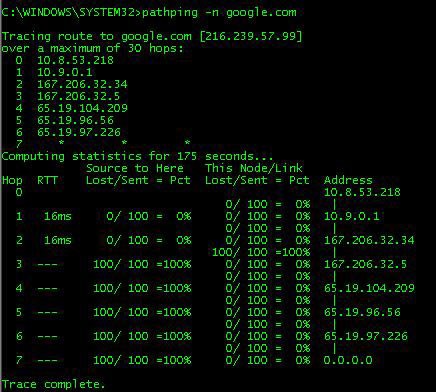
			Ping là gì và cách hoạt động của Ping như thế nào ?Trong bài này tôi hướng dẫn các bạn sử dụng các lệnh ping, traceroute/tracert và pathping . qua các ví dụ có thể phân biệt được sự khác nhau giữa các lệnh này
		</div>
				<div class="imghome">
			<img alt="Cách sử dụng lệnh ping, traceroute&#x002F;tracert và pathping" src="https://test.softbiz.vn/uploads/news/2026_05/image_8.png" width="460" class="img-thumbnail" />
		</div>
		<div class="clear"></div>
		<div id="bodytext" class="clearfix">
			<p style="background-color:white;line-height:20.4pt;margin-bottom:11.25pt;text-align:left;" align="left"><span style="background-color:white;color:black;font-family:Roboto;font-size:10.5pt;">Ping (Packet InterNet Groper) là một chương trình dòng lệnh dùng&nbsp;để&nbsp;kiểm tra 2 thiết bị&nbsp;trong mạng có&nbsp;thể&nbsp;kết nối với nhau hay không. Ping còn&nbsp;được dùng&nbsp;để</span><span style="background-color:white;color:rgb(51,51,51);font-family:Roboto;font-size:10.5pt;">&nbsp;</span><span style="background-color:white;color:black;font-family:Roboto;font-size:10.5pt;">đo&nbsp;đường thời gian trễ&nbsp;của gói tin trong mạng.&nbsp;Đa số&nbsp;các hệ</span><span style="background-color:white;color:rgb(51,51,51);font-family:Roboto;font-size:10.5pt;">&nbsp;</span><span style="background-color:white;color:black;font-family:Roboto;font-size:10.5pt;">điều hành như&nbsp;Linux, Windows&nbsp;đều hỗ&nbsp;trợ&nbsp;lệnh ping</span><br /><span style="background-color:white;color:rgb(85,85,85);font-family:Roboto;font-size:10.5pt;"><strong>Ping hoạt&nbsp;động như&nbsp;thế&nbsp;nào?</strong></span><br /><span style="background-color:white;color:black;font-family:Roboto;font-size:10.5pt;">Lệnh ping hoạt&nbsp;động theo 3 bước&nbsp;đơn giản sau:</span></p><ul style="list-style-type:disc;"><li class="ck-list-marker-font-size ck-list-marker-color ck-list-marker-font-family" style="--ck-content-list-marker-color:black;--ck-content-list-marker-font-family:Roboto;--ck-content-list-marker-font-size:10.5pt;background-color:white;color:rgb(51, 51, 51);line-height:20.4pt;tab-stops:list 36.0pt;text-align:left;" data-list-item-id="e0cefdf4ccc28c25e3ff6580e67833d36"><span style="background-color:white;color:black;font-family:Roboto;font-size:10.5pt;">Đầu tiên máy tính của bạn (máy tính A) sẽ&nbsp;gửi gói tin (packet)&nbsp;đến một máy tính khác (máy tính B).</span></li><li class="ck-list-marker-font-size ck-list-marker-color ck-list-marker-font-family" style="--ck-content-list-marker-color:black;--ck-content-list-marker-font-family:Roboto;--ck-content-list-marker-font-size:10.5pt;background-color:white;color:rgb(51, 51, 51);line-height:20.4pt;tab-stops:list 36.0pt;text-align:left;" data-list-item-id="ef0df0ee536040eb5923d02804a7eff4d"><span style="background-color:white;color:black;font-family:Roboto;font-size:10.5pt;">Sau&nbsp;đó&nbsp;máy tính này (máy tính B) sẽ&nbsp;nhận&nbsp;được gói tin mà&nbsp;máy tính của bạn (máy tính A)&nbsp;đã&nbsp;gửi.</span></li><li class="ck-list-marker-font-size ck-list-marker-color ck-list-marker-font-family" style="--ck-content-list-marker-color:black;--ck-content-list-marker-font-family:Roboto;--ck-content-list-marker-font-size:10.5pt;background-color:white;color:rgb(51, 51, 51);line-height:20.4pt;tab-stops:list 36.0pt;text-align:left;" data-list-item-id="eaf7e0a59c01dc0d735b7c91060889b77"><span style="background-color:white;color:black;font-family:Roboto;font-size:10.5pt;">Máy tính&nbsp;đó&nbsp;(máy tính B) sẽ&nbsp;phản hồi lại gói tin mà&nbsp;máy tính của bạn (máy tính A)&nbsp;đã&nbsp;gửi.</span></li></ul><p style="background-color:white;line-height:20.4pt;margin-bottom:11.25pt;text-align:left;" align="left"><span style="background-color:white;color:black;font-family:Roboto;font-size:10.5pt;">Ví dụ&nbsp;là&nbsp;chúng ta sẽ&nbsp;dùng lệnh ping&nbsp;để&nbsp;ping&nbsp;đến Google</span><br /><span style="background-color:white;color:rgb(51,51,51);font-family:Roboto;font-size:10.5pt;"><i>ping google.com.vn</i></span><br /><span style="color:rgb(51,51,51);font-family:Roboto;font-size:10.5pt;"><span><img src="https://test.softbiz.vn/uploads/news/2026_05/image_8.jpeg" width="541" height="211" v:shapes="Picture_x0020_32" uploadprocessed="true" /></span></span><br /><span style="background-color:white;color:black;font-family:Roboto;font-size:10.5pt;">Mặc&nbsp;định là&nbsp;lệnh ping trong Windows sẽ&nbsp;gửi 4 gói tin (packet)&nbsp;đến Google.&nbsp;Đa số&nbsp;thời gian mà&nbsp;các gói tin chúng ta gửi&nbsp;đi&nbsp;đều mất 23ms. Lưu&nbsp;ý</span><span style="background-color:white;color:rgb(51,51,51);font-family:Roboto;font-size:10.5pt;">&nbsp;</span><span style="background-color:white;color:black;font-family:Roboto;font-size:10.5pt;">đơn vị&nbsp;thời gian mà&nbsp;lệnh ping sử&nbsp;dụng là&nbsp;mili giây (ms), 1 giây thì&nbsp;bằng 1000 mili giây.&nbsp;Đều này có&nbsp;nghĩa là&nbsp;các gói tin này mất&nbsp;đến 23ms&nbsp;để&nbsp;gửi&nbsp;đến Google và&nbsp;sau&nbsp;đó&nbsp;quay về&nbsp;lại với máy tính của ta. Các gói tin mà&nbsp;chúng ta gửi&nbsp;đi&nbsp;đều có&nbsp;kích thước mặc&nbsp;định là&nbsp;32 byte. Bạn có&nbsp;thể&nbsp;tăng kích thước của gói tin bằng cách sử&nbsp;dụng tham số&nbsp;-l:</span></p><p style="background-color:white;line-height:20.4pt;margin-bottom:11.25pt;text-align:left;" align="left"><span style="background-color:rgb(241,241,241);color:rgb(51,51,51);font-family:Roboto;font-size:10.5pt;"><i>ping -l kich_thuoc_byte tentrangweb.com</i></span></p><p style="background-color:white;line-height:20.4pt;margin-bottom:11.25pt;text-align:left;" align="left"><span style="color:rgb(51,51,51);font-family:Roboto;font-size:10.5pt;"><img src="https://test.softbiz.vn/uploads/news/2026_05/image_9.jpeg" width="543" height="156" v:shapes="Picture_x0020_31" uploadprocessed="true" /></span><br /><span style="background-color:white;color:black;font-family:Roboto;font-size:10.5pt;">Việc có&nbsp;mất nhiều thời gian&nbsp;để&nbsp;các gói tin có&nbsp;thể&nbsp;trở&nbsp;về&nbsp;hay không còn tuỳ&nbsp;thuộc vào kết nối mạng của bạn.</span><br /><span style="background-color:white;color:black;font-family:Roboto;font-size:10.5pt;">Như</span><span style="background-color:white;color:rgb(51,51,51);font-family:Roboto;font-size:10.5pt;">&nbsp;</span><span style="background-color:white;color:black;font-family:Roboto;font-size:10.5pt;">đã&nbsp;nói&nbsp;ở&nbsp;trên thì&nbsp;lệnh ping mặc&nbsp;định chỉ&nbsp;gửi 4 gói tin nhưng bạn có&nbsp;thể&nbsp;chỉ</span><span style="background-color:white;color:rgb(51,51,51);font-family:Roboto;font-size:10.5pt;">&nbsp;</span><span style="background-color:white;color:black;font-family:Roboto;font-size:10.5pt;">định cho lệnh ping gửi bao nhiêu gói tin mà&nbsp;bạn muốn bằng cách sử&nbsp;dụng tham số&nbsp;-n.</span></p><p style="background-color:white;line-height:20.4pt;margin-bottom:11.25pt;text-align:left;" align="left"><span style="background-color:rgb(241,241,241);color:rgb(51,51,51);font-family:Roboto;font-size:10.5pt;"><i>ping -n so_goi_tin tentrangweb.co</i></span></p><p style="background-color:white;line-height:20.4pt;margin-bottom:11.25pt;text-align:left;" align="left"><span style="color:rgb(51,51,51);font-family:Roboto;font-size:10.5pt;"><img src="https://test.softbiz.vn/uploads/news/2026_05/image_11.jpeg" width="561" height="229" v:shapes="Picture_x0020_30" uploadprocessed="true" /></span><br /><span style="background-color:white;color:black;font-family:Roboto;font-size:10.5pt;">Đối với tham số&nbsp;-n thì&nbsp;bạn cần phải chỉ</span><span style="background-color:white;color:rgb(51,51,51);font-family:Roboto;font-size:10.5pt;">&nbsp;</span><span style="background-color:white;color:black;font-family:Roboto;font-size:10.5pt;">định là&nbsp;gửi bao nhiêu gói tin nhưng nếu bạn dùng tham số&nbsp;-t thì&nbsp;lệnh ping sẽ&nbsp;gửi gói tin&nbsp;đến vô&nbsp;tận và</span><span style="background-color:white;color:rgb(51,51,51);font-family:Roboto;font-size:10.5pt;">&nbsp;</span><span style="background-color:white;color:black;font-family:Roboto;font-size:10.5pt;">đến khi nào bạn nhấn Ctrl + C thì&nbsp;lệnh ping mới kết thúc.</span></p><p style="background-color:white;line-height:20.4pt;margin-bottom:11.25pt;text-align:left;" align="left"><span style="background-color:rgb(241,241,241);color:rgb(51,51,51);font-family:Roboto;font-size:10.5pt;"><i>ping -t tentrangweb.com</i></span></p><p style="background-color:white;line-height:20.4pt;margin-bottom:11.25pt;text-align:left;" align="left"><span style="color:rgb(51,51,51);font-family:Roboto;font-size:10.5pt;"><img src="https://test.softbiz.vn/uploads/news/2026_05/image_10.jpeg" width="579" height="163" v:shapes="Picture_x0020_29" uploadprocessed="true" /></span><br /><span style="background-color:white;color:rgb(85,85,85);font-family:Roboto;font-size:10.5pt;"><strong>Ping gửi gói tin bằng cách sử&nbsp;dụng giao thức ICMP</strong></span><br /><span style="background-color:white;color:black;font-family:Roboto;font-size:10.5pt;">Khi chúng ta sử&nbsp;dụng lệnh ping thì lúc này lệnh ping sẽ&nbsp;gửi gói tin&nbsp;đi qua giao thức ICMP (InternetControl Message Protocol). ICMP là&nbsp;một giao thức dùng&nbsp;để&nbsp;kiểm tra xem 2 máy tính trong mạng có&nbsp;thể&nbsp;giao tiếp với nhau không. Các gói tin ICMP sẽ&nbsp;gửi yêu cầu&nbsp;“echo”</span><span style="background-color:white;color:rgb(51,51,51);font-family:Roboto;font-size:10.5pt;">&nbsp;</span><span style="background-color:white;color:black;font-family:Roboto;font-size:10.5pt;">đến máy tính khác. Và nếu như&nbsp;máy tính&nbsp;đó&nbsp;nhận&nbsp;được gói tin mà&nbsp;ta gửi thì&nbsp;sẽ&nbsp;phản hồi lại. Tuy nhiên, cũng có&nbsp;một số&nbsp;máy tính và&nbsp;máy chủ</span><span style="background-color:white;color:rgb(51,51,51);font-family:Roboto;font-size:10.5pt;">&nbsp;</span><span style="background-color:white;color:black;font-family:Roboto;font-size:10.5pt;">được thiết lập là&nbsp;sẽ&nbsp;không phản hồi lại&nbsp;đối với gói tin ICMP. Và&nbsp;tất nhiên kết quả&nbsp;mà&nbsp;bạn sẽ&nbsp;nhận&nbsp;được Request timed out</span><br /><span style="color:rgb(51,51,51);font-family:Roboto;font-size:10.5pt;"><span><img src="https://test.softbiz.vn/uploads/news/2026_05/image_13.jpeg" width="549" height="126" v:shapes="Picture_x0020_28" uploadprocessed="true" /></span></span><br /><span style="background-color:white;color:black;font-family:Roboto;font-size:10.5pt;">Việc làm như&nbsp;vậy là</span><span style="background-color:white;color:rgb(51,51,51);font-family:Roboto;font-size:10.5pt;">&nbsp;</span><span style="background-color:white;color:black;font-family:Roboto;font-size:10.5pt;">để&nbsp;tránh các cuộc tấn công từ&nbsp;chối dịch vụ&nbsp;(DDoS). Thay vì&nbsp;bạn dùng lệnh ping&nbsp;để&nbsp;gửi gói tin&nbsp;đến một máy tính khác thì&nbsp;bạn cũng có&nbsp;thể&nbsp;gửi gói tin&nbsp;đó</span><span style="background-color:white;color:rgb(51,51,51);font-family:Roboto;font-size:10.5pt;">&nbsp;</span><span style="background-color:white;color:black;font-family:Roboto;font-size:10.5pt;">đến chính máy tính của mình bằng cách sử&nbsp;dụng lệnh:</span><br /><span style="background-color:white;color:rgb(51,51,51);font-family:Roboto;font-size:10.5pt;"><i>ping localhost</i></span><br /><span style="background-color:white;color:black;font-family:Roboto;font-size:10.5pt;">hoặc</span><br /><span style="background-color:white;color:rgb(51,51,51);font-family:Roboto;font-size:10.5pt;"><i>ping 127.0.0.1</i></span><br /><span style="color:rgb(51,51,51);font-family:Roboto;font-size:10.5pt;"><span><img src="https://test.softbiz.vn/uploads/news/2026_05/image_12.jpeg" width="483" height="157" v:shapes="Picture_x0020_27" uploadprocessed="true" /></span></span><br /><span style="background-color:white;color:black;font-family:Roboto;font-size:10.5pt;">Và các gói tin mà bạn gửi&nbsp;đi và&nbsp;quay về</span><span style="background-color:white;color:rgb(51,51,51);font-family:Roboto;font-size:10.5pt;">&nbsp;</span><span style="background-color:white;color:black;font-family:Roboto;font-size:10.5pt;">đều mất khoảng thời gian là&nbsp;nhỏ&nbsp;hơn 1ms. Sở&nbsp;dĩ&nbsp;thời gian ngắn&nbsp;đến như&nbsp;vậy là&nbsp;máy tính của bạn tự&nbsp;gói tin&nbsp;đi và sau&nbsp;đó&nbsp;tự&nbsp;trả&nbsp;lời lại nên mất rất&nbsp;ít thời gian.</span><br /><span style="background-color:white;color:black;font-family:Roboto;font-size:10.5pt;">Thường thì&nbsp;ta làm như&nbsp;vậy là</span><span style="background-color:white;color:rgb(51,51,51);font-family:Roboto;font-size:10.5pt;">&nbsp;</span><span style="background-color:white;color:black;font-family:Roboto;font-size:10.5pt;">để&nbsp;kiểm tra xem ngăn xếp TCP/IP của máy tính của mình có&nbsp;hoạt&nbsp;động tốt không.</span><br /><span style="background-color:white;color:rgb(85,85,85);font-family:Roboto;font-size:10.5pt;"><strong>Tracert là gì ? Cách sử&nbsp;dụng Tracert và&nbsp;phân tích&nbsp;đường&nbsp;đi của ICMP</strong></span><br /><span style="background-color:white;color:rgb(51,51,51);font-family:Roboto;font-size:10.5pt;"><i>Tracert (hay Traceroute) là công cụ&nbsp;dựa trên nền tảng Windows cho phép bạn hỗ&nbsp;trợ&nbsp;chương trình kiểm tra cơ&nbsp;sở&nbsp;hạ&nbsp;tầng mạng. Trong bài này chúng tôi giới thiệu cách dùng Tracert&nbsp;để&nbsp;sửa chữa các vấn&nbsp;đề&nbsp;gặp trong thực tế.&nbsp;Điều này giúp tăng cường tính hữu&nbsp;ích của công cụ&nbsp;và&nbsp;chỉ&nbsp;cho bạn một số&nbsp;cách dùng khi làm việc với các mạng riêng của mình.</i></span><br /><span style="background-color:white;color:black;font-family:Roboto;font-size:10.5pt;">Tiện ích TCP/IP (Xem thêm về&nbsp;TCP/IP là&nbsp;gì&nbsp;?) này cho phép bạn xác&nbsp;định các gói&nbsp;định hướng lưu chuyển trong toàn bộ&nbsp;mạng tới host cụ&nbsp;thể&nbsp;theo yêu cầu của bạn. Tracert hoạt&nbsp;động bằng cách tăng thêm giá&nbsp;trị</span><span style="background-color:white;color:rgb(51,51,51);font-family:Roboto;font-size:10.5pt;">&nbsp;</span><span style="background-color:white;color:black;font-family:Roboto;font-size:10.5pt;">“thời gian sống”&nbsp;(TTL) cho từng gói liên tiếp&nbsp;được gửi&nbsp;đi. Khi một gói&nbsp;đi qua một host, host này sẽ&nbsp;giảm TTL&nbsp;đi một giá&nbsp;trị&nbsp;và&nbsp;tiếp tục gửi nó&nbsp;sang host kế&nbsp;tiếp. Khi một gói có&nbsp;TTL</span><span style="background-color:white;color:rgb(51,51,51);font-family:Roboto;font-size:10.5pt;">&nbsp;</span><span style="background-color:white;color:black;font-family:Roboto;font-size:10.5pt;"><i>(Time to live)</i></span><span style="background-color:white;color:rgb(51,51,51);font-family:Roboto;font-size:10.5pt;">&nbsp;</span><span style="background-color:white;color:black;font-family:Roboto;font-size:10.5pt;">đến&nbsp;được host cần tới, host sẽ&nbsp;loại bỏ&nbsp;gói và&nbsp;gửi thông báo thời gian ICMP (Xem thêm về&nbsp;ICMP là&nbsp;gì&nbsp;? ) quá&nbsp;hạn. Tracert nếu&nbsp;được dùng phù&nbsp;hợp và&nbsp;chính xác có&nbsp;thể&nbsp;giúp bạn tìm ra các&nbsp;điểm&nbsp;định tuyến không chính xác hoặc không tồn tại trong mạng của bạn.</span><br /><span style="background-color:white;color:rgb(85,85,85);font-family:Roboto;font-size:10.5pt;"><strong>Giới thiệu về&nbsp;Tracert</strong></span><br /><span style="background-color:white;color:black;font-family:Roboto;font-size:10.5pt;"><strong>Tracert</strong>&nbsp;là công cụ&nbsp;dòng lệnh nền tảng Windows dùng&nbsp;để&nbsp;xác&nbsp;định&nbsp;đường&nbsp;đi từ&nbsp;nguồn tới&nbsp;đích của một gói Giao thức mạng Internet (IP&nbsp;–&nbsp;Internet Protocol).</span><span style="background-color:white;color:rgb(51,51,51);font-family:Roboto;font-size:10.5pt;">&nbsp;</span><span style="background-color:white;color:black;font-family:Roboto;font-size:10.5pt;"><strong>Tracert</strong>&nbsp;tìm&nbsp;đường tới&nbsp;đích bằng cách gửi các thông báo Echo Request (yêu cầu báo hiệu lại) Internet Control Message Protocol (ICMP) tới từng&nbsp;đích. Sau mỗi lần gặp một&nbsp;đích, giá&nbsp;trị&nbsp;Time to Live (TTL), tức thời gian cần&nbsp;để&nbsp;gửi&nbsp;đi sẽ</span><span style="background-color:white;color:rgb(51,51,51);font-family:Roboto;font-size:10.5pt;">&nbsp;</span><span style="background-color:white;color:black;font-family:Roboto;font-size:10.5pt;">được tăng lên cho tới khi gặp&nbsp;đúng&nbsp;đích cần&nbsp;đến.&nbsp;Đường&nbsp;đi&nbsp;được xác&nbsp;định từ&nbsp;quá&nbsp;trình này.</span><br /><span style="background-color:white;color:black;font-family:Roboto;font-size:10.5pt;">Nhìn vào hình minh hoạ&nbsp;sau bạn có&nbsp;thể&nbsp;hình dung ra&nbsp;được cách thức Tracert hoạt&nbsp;động trong một mạng sản xuất.</span><br /><span style="color:rgb(51,51,51);font-family:Roboto;font-size:10.5pt;"><span><img src="https://test.softbiz.vn/uploads/news/2026_05/image_15.jpeg" width="518" height="252" v:shapes="Picture_x0020_26" uploadprocessed="true" /></span></span><span style="background-color:white;color:rgb(85,85,85);font-family:Roboto;font-size:10.5pt;"><strong>Sử&nbsp;dụng Tracert như&nbsp;thế&nbsp;nào</strong></span><br /><span style="background-color:white;color:black;font-family:Roboto;font-size:10.5pt;">Như&nbsp;bạn thấy&nbsp;ở&nbsp;hình minh hoạ, chúng ta sẽ&nbsp;gửi lưu lượng từ&nbsp;trạm kiểm tra bên B (Site B) tới một server&nbsp;ở&nbsp;bên A (Site A). Các gói tin sẽ&nbsp;truyền&nbsp;đi trong mạng diện rộng (WAN), phân tách thành hai phía nối với nhau qua liên kết T1 và&nbsp;một liên kết dự&nbsp;phòng ISDN (Integrated Services Digital Network).&nbsp;Để&nbsp;dùng tiện&nbsp;ích Tracert,&nbsp;đơn giản bạn chỉ&nbsp;cần biết&nbsp;địa chỉ&nbsp;IP của máy&nbsp;đích muốn gửi&nbsp;đến, cách sử&nbsp;dụng Tracert chính xác và&nbsp;bạn cần tìm cái gì&nbsp;trong kết quả.</span><br /><span style="background-color:white;color:black;font-family:Roboto;font-size:10.5pt;">Tracert hoạt&nbsp;động dựa vào thao tác với trường Time to Live (TTL). Bằng cách tăng TTL và&nbsp;sau mỗi lần gặp router, giá&nbsp;trị&nbsp;của nó&nbsp;lại giảm&nbsp;đi một, gói tin&nbsp;được gửi tới router tiếp theo. Mỗi lần gói tin&nbsp;được gửi từ&nbsp;router này&nbsp;đến router khác, người ta gọi là&nbsp;nó</span><span style="background-color:white;color:rgb(51,51,51);font-family:Roboto;font-size:10.5pt;">&nbsp;</span><span style="background-color:white;color:black;font-family:Roboto;font-size:10.5pt;">đã&nbsp;thực hiện một bước nhảy (hop). Khi trường TTL có&nbsp;giá&nbsp;trị&nbsp;trở&nbsp;về&nbsp;0, router sẽ&nbsp;gửi thông báo&nbsp;“Time Exceeded”&nbsp;ICMP (hết thời gian) tới máy nguồn. Bạn có&nbsp;thể&nbsp;xem ví&nbsp;dụ&nbsp;với mạng mẫu sau của chúng tôi trong phần minh hoạ&nbsp;bên dưới. Với&nbsp;địa chỉ&nbsp;IP nguồn và</span><span style="background-color:white;color:rgb(51,51,51);font-family:Roboto;font-size:10.5pt;">&nbsp;</span><span style="background-color:white;color:black;font-family:Roboto;font-size:10.5pt;">đích,…&nbsp;chúng ta sẽ&nbsp;dùng trạm làm việc&nbsp;ở&nbsp;Site B và&nbsp;server bên Site A&nbsp;để&nbsp;thực hiện bài kiểm tra.</span><br /><span style="color:rgb(51,51,51);font-family:Roboto;font-size:10.5pt;"><span><img src="https://test.softbiz.vn/uploads/news/2026_05/image_18.jpeg" width="479" height="258" v:shapes="Picture_x0020_25" uploadprocessed="true" /></span></span><span style="background-color:white;color:black;font-family:Roboto;font-size:10.5pt;">Từ&nbsp;minh hoạ&nbsp;này bạn có&nbsp;thể&nbsp;thấy, IP nguồn là&nbsp;10.1.2.4 và&nbsp;IP&nbsp;đích (ví&nbsp;dụ) có&nbsp;thể&nbsp;là&nbsp;10.1.1.6. Việc&nbsp;định tuyến thông thường diễn ra từ&nbsp;Site B sang Site A, qua liên kết có&nbsp;dung lượng cao hơn là&nbsp;T1 (1.544 Mbqs). Liên kết ISDN có&nbsp;dung lượng 128 Kbqs chỉ</span><span style="background-color:white;color:rgb(51,51,51);font-family:Roboto;font-size:10.5pt;">&nbsp;</span><span style="background-color:white;color:black;font-family:Roboto;font-size:10.5pt;">được dùng dự&nbsp;phòng trong trường hợp liên kết chính gặp lỗi. Tracert sẽ&nbsp;chỉ&nbsp;cho bạn thấy các gói tin&nbsp;được gửi từ&nbsp;Site B, tại máy có</span><span style="background-color:white;color:rgb(51,51,51);font-family:Roboto;font-size:10.5pt;">&nbsp;</span><span style="background-color:white;color:black;font-family:Roboto;font-size:10.5pt;">địa chỉ&nbsp;10.1.2.4, qua liên kết T1 tới máy có</span><span style="background-color:white;color:rgb(51,51,51);font-family:Roboto;font-size:10.5pt;">&nbsp;</span><span style="background-color:white;color:black;font-family:Roboto;font-size:10.5pt;">địa chỉ&nbsp;10.1.1.1. như&nbsp;thế&nbsp;nào. Bạn còn có&nbsp;thể&nbsp;biết&nbsp;được cách gửi các gói tin tới mạng LAN cục bộ&nbsp;(10.1.1.0) và&nbsp;cuối cùng là&nbsp;10.1.1.6 như&nbsp;thế&nbsp;nào.</span><br /><span style="background-color:white;color:black;font-family:Roboto;font-size:10.5pt;">Khi các gói tin&nbsp;đã</span><span style="background-color:white;color:rgb(51,51,51);font-family:Roboto;font-size:10.5pt;">&nbsp;</span><span style="background-color:white;color:black;font-family:Roboto;font-size:10.5pt;">được gửi&nbsp;đi, Tracert sẽ&nbsp;dùng giao diện&nbsp;đầu tiên trên router nó&nbsp;nhìn thấy&nbsp;để&nbsp;thông báo lại các bước nhảy router. Vì&nbsp;thế, hãy xem xét toàn bộ</span><span style="background-color:white;color:rgb(51,51,51);font-family:Roboto;font-size:10.5pt;">&nbsp;</span><span style="background-color:white;color:black;font-family:Roboto;font-size:10.5pt;">đường&nbsp;đi hoàn chỉnh của chúng ta trước khi gửi các gói tin&nbsp;đi.</span><br /><span style="color:rgb(51,51,51);font-family:Roboto;font-size:10.5pt;"><span><img src="https://test.softbiz.vn/uploads/news/2026_05/image_14.jpeg" width="479" height="260" v:shapes="Picture_x0020_24" uploadprocessed="true" /></span></span><br /><span style="background-color:white;color:black;font-family:Roboto;font-size:10.5pt;">Đường&nbsp;đi (được tô&nbsp;màu&nbsp;đỏ&nbsp;trên hình) là&nbsp;danh sách các router nằm giữa host nguồn và&nbsp;host&nbsp;đích. Một&nbsp;điểm rất quan trọng cần nhớ&nbsp;là&nbsp;các giao diện&nbsp;ở&nbsp;phía bên trái sẽ</span><span style="background-color:white;color:rgb(51,51,51);font-family:Roboto;font-size:10.5pt;">&nbsp;</span><span style="background-color:white;color:black;font-family:Roboto;font-size:10.5pt;">được dùng khi mô&nbsp;tả. Giao diện bên trái là&nbsp;giao diện của router gần nhất với host gửi tin trong&nbsp;đường&nbsp;đi. Trong ví&nbsp;dụ&nbsp;này bạn có&nbsp;thể&nbsp;thấy&nbsp;đường&nbsp;đi qua T1, từ&nbsp;phía B (Site B) sang phía A (Site A). Bây giờ&nbsp;chúng ta hãy cùng xem tại sao&nbsp;điều này lại quan trọng.</span><br /><span style="background-color:white;color:black;font-family:Roboto;font-size:10.5pt;">Vậy các cách làm việc của tracert là&nbsp;gì? Khi khởi chạy và&nbsp;sử&nbsp;dụng, tracert sẽ&nbsp;báo cáo (in ra) danh sách&nbsp;đã</span><span style="background-color:white;color:rgb(51,51,51);font-family:Roboto;font-size:10.5pt;">&nbsp;</span><span style="background-color:white;color:black;font-family:Roboto;font-size:10.5pt;">được sắp xếp các&nbsp;địa chỉ&nbsp;của từng host mà&nbsp;nó</span><span style="background-color:white;color:rgb(51,51,51);font-family:Roboto;font-size:10.5pt;">&nbsp;</span><span style="background-color:white;color:black;font-family:Roboto;font-size:10.5pt;">đã</span><span style="background-color:white;color:rgb(51,51,51);font-family:Roboto;font-size:10.5pt;">&nbsp;</span><span style="background-color:white;color:black;font-family:Roboto;font-size:10.5pt;">đi qua trên&nbsp;đường&nbsp;đến&nbsp;đích.&nbsp;Điều này thực sự&nbsp;hay vì bạn có&nbsp;thể&nbsp;biết&nbsp;được nhiều hơn về</span><span style="background-color:white;color:rgb(51,51,51);font-family:Roboto;font-size:10.5pt;">&nbsp;</span><span style="background-color:white;color:black;font-family:Roboto;font-size:10.5pt;">đường&nbsp;đi này. Nếu bạn thu&nbsp;được phần gần mặt phân cách, bạn sẽ&nbsp;thấy một thiết lập mới của&nbsp;địa chỉ&nbsp;IP trong hình minh họa tiếp theo (192.168.10.1 và&nbsp;192.168.11.1) 10.1&nbsp;được sử&nbsp;dụng cho liên kết ISDN và&nbsp;11.1 sử&nbsp;dụng cho liên kết T1. Vậy tại sao&nbsp;điều này lại quan trọng?</span><br /><span style="background-color:white;color:black;font-family:Roboto;font-size:10.5pt;">Khi nhận&nbsp;được kết quả&nbsp;từ&nbsp;Tracert, một số&nbsp;người không thạo làm việc với công cụ&nbsp;này sẽ&nbsp;thấy lúng túng. Router cổng vào 10.1.1.1 mặc&nbsp;định của Site A&nbsp;được thay thế&nbsp;bằng&nbsp;địa chỉ&nbsp;WAN. Chỉ&nbsp;là&nbsp;một router nhưng giao diện khác.&nbsp;Điều này mang tính chất bắt buộc khi muốn kiểm tra với Tracert bởi vì&nbsp;nếu bạn nhầm, bạn sẽ&nbsp;không biết&nbsp;được mình&nbsp;đang&nbsp;đọc gì.</span><br /><span style="background-color:white;color:black;font-family:Roboto;font-size:10.5pt;">Ví dụ,&nbsp;đường&nbsp;đi bạn thấy&nbsp;ở&nbsp;hình minh hoạ&nbsp;trên là&nbsp;từ&nbsp;10.1.2.4 tới 10.1.2.1 (cổng vào mặc&nbsp;định của mạng LAN). Sau&nbsp;đó&nbsp;nó&nbsp;sẽ&nbsp;qua mạng WAN tới 10.1.1.1. Chỉ&nbsp;có&nbsp;một vấn&nbsp;đề&nbsp;xuất hiện&nbsp;ở</span><span style="background-color:white;color:rgb(51,51,51);font-family:Roboto;font-size:10.5pt;">&nbsp;</span><span style="background-color:white;color:black;font-family:Roboto;font-size:10.5pt;">đây là&nbsp;bạn sẽ&nbsp;không thấy&nbsp;địa chỉ&nbsp;xuất hiện. Sau khi T1 có&nbsp;giao diện trên router (11.1) của phía A (Site A) và&nbsp;thực hiện liên kết ISDN (10.1) thì&nbsp;hai&nbsp;địa chỉ&nbsp;IP này là&nbsp;quan trọng nhất trong kết quả&nbsp;trả&nbsp;ra của Tracert.&nbsp;Đó&nbsp;là&nbsp;do trong ví&nbsp;dụ&nbsp;này T1 có&nbsp;thể&nbsp;bị&nbsp;lỗi và</span><span style="background-color:white;color:rgb(51,51,51);font-family:Roboto;font-size:10.5pt;">&nbsp;</span><span style="background-color:white;color:black;font-family:Roboto;font-size:10.5pt;">đường&nbsp;đi bây giờ&nbsp;là&nbsp;qua ISDN.&nbsp;Điều này hoạt&nbsp;động&nbsp;“như</span><span style="background-color:white;color:rgb(51,51,51);font-family:Roboto;font-size:10.5pt;">&nbsp;</span><span style="background-color:white;color:black;font-family:Roboto;font-size:10.5pt;">được công khai hoá”. Nhưng chuyện gì&nbsp;sẽ&nbsp;xảy ra nếu bạn&nbsp;để&nbsp;T1 online trở&nbsp;lại (trừ&nbsp;trường hợp bạn cảm thấy tốc&nbsp;độ&nbsp;mạng của mình tại T1 tụt từ&nbsp;1.544 Mbqs xuống còn 128 Kbqs), bạn không nên dùng liên kết ISDN thêm phút nào nữa.&nbsp;Đó&nbsp;là</span><span style="background-color:white;color:rgb(51,51,51);font-family:Roboto;font-size:10.5pt;">&nbsp;</span><span style="background-color:white;color:black;font-family:Roboto;font-size:10.5pt;">điều chúng ta sẽ&nbsp;kiểm tra.</span><br /><span style="color:rgb(51,51,51);font-family:Roboto;font-size:10.5pt;"><span><img src="https://test.softbiz.vn/uploads/news/2026_05/image_16.jpeg" width="479" height="258" v:shapes="Picture_x0020_23" uploadprocessed="true" /></span></span><br /><span style="background-color:white;color:rgb(85,85,85);font-family:Roboto;font-size:10.5pt;"><strong>Kiểm tra Tracert</strong></span><br /><span style="background-color:white;color:black;font-family:Roboto;font-size:10.5pt;">Bây giờ,&nbsp;để&nbsp;dùng Tracert,&nbsp;đơn giản bạn chỉ&nbsp;cần mở&nbsp;màn hình lệnh Command Prompt.&nbsp;Để&nbsp;thực hiện&nbsp;điều này, bạn vào</span><span style="background-color:white;color:rgb(51,51,51);font-family:Roboto;font-size:10.5pt;">&nbsp;</span><span style="background-color:white;color:black;font-family:Roboto;font-size:10.5pt;"><strong>Start&nbsp;</strong>-&gt;&nbsp;<strong>Run&nbsp;</strong>-&gt;&nbsp;<strong>cmd&nbsp;</strong>-&gt; tracert</span><br /><span style="background-color:white;color:black;font-family:Roboto;font-size:10.5pt;"><strong>Chú ý</strong>:&nbsp;<i>bạn phải gõ</i></span><span style="background-color:white;color:rgb(51,51,51);font-family:Roboto;font-size:10.5pt;"><i>&nbsp;</i></span><span style="background-color:white;color:black;font-family:Roboto;font-size:10.5pt;"><i>“tracert”&nbsp;vì&nbsp;bạn có&nbsp;thể&nbsp;thấy Traceroute chỉ&nbsp;hoạt&nbsp;động trên UNIX/Linux và&nbsp;các hệ&nbsp;thống khác như&nbsp;Cisco,&nbsp;…</i></span><br /><span style="color:rgb(51,51,51);font-family:Roboto;font-size:10.5pt;"><span><img src="https://test.softbiz.vn/uploads/news/2026_05/image_17.jpeg" width="551" height="250" v:shapes="Picture_x0020_22" uploadprocessed="true" /></span></span><span style="background-color:white;color:black;font-family:Roboto;font-size:10.5pt;">Đầu tiên chúng ta hãy xem mọi việc diễn ra như&nbsp;thế&nbsp;nào khi dùng T1.</span></p><p style="background-color:white;line-height:20.4pt;margin-bottom:11.25pt;text-align:left;" align="left"><span style="background-color:rgb(241,241,241);color:rgb(51,51,51);font-family:Roboto;font-size:10.5pt;"><i>C:\&gt;tracert 10.1.1.6</i></span><br /><span style="background-color:rgb(241,241,241);color:rgb(51,51,51);font-family:Roboto;font-size:10.5pt;"><i>Tracing route to 10.1.1.6 over a maximum of 30 hops (Xác định đường đi tới địa chỉ 10.1.1.6 qua tối đa 30 bước nhảy)</i></span><br /><span style="background-color:rgb(241,241,241);color:rgb(51,51,51);font-family:Roboto;font-size:10.5pt;"><i>---------------------------------------------------</i></span><br /><span style="background-color:rgb(241,241,241);color:rgb(51,51,51);font-family:Roboto;font-size:10.5pt;"><i>1 2 ms 3 ms 2 ms 10.1.2.1</i></span><br /><span style="background-color:rgb(241,241,241);color:rgb(51,51,51);font-family:Roboto;font-size:10.5pt;"><i>2 25 ms 83 ms 88 ms 192.168.11.1</i></span><br /><span style="background-color:rgb(241,241,241);color:rgb(51,51,51);font-family:Roboto;font-size:10.5pt;"><i>3 25 ms 79 ms 93 ms 10.1.1.6</i></span><br /><span style="background-color:rgb(241,241,241);color:rgb(51,51,51);font-family:Roboto;font-size:10.5pt;"><i>Trace complete.</i></span></p><p style="background-color:white;line-height:20.4pt;margin-bottom:11.25pt;text-align:left;" align="left"><span style="background-color:white;color:black;font-family:Roboto;font-size:10.5pt;">Bây giờ, nếu T1 bị&nbsp;lỗi và&nbsp;chuyển sang dùng ISDN, bạn sẽ&nbsp;thấy có&nbsp;một&nbsp;‘đường&nbsp;đi’&nbsp;khác và&nbsp;nó</span><span style="background-color:white;color:rgb(51,51,51);font-family:Roboto;font-size:10.5pt;">&nbsp;</span><span style="background-color:white;color:black;font-family:Roboto;font-size:10.5pt;">‘dài hơn’&nbsp;so với&nbsp;đường&nbsp;đi ban&nbsp;đầu.</span></p><p style="background-color:white;line-height:20.4pt;margin-bottom:11.25pt;text-align:left;" align="left"><span style="background-color:rgb(241,241,241);color:rgb(51,51,51);font-family:Roboto;font-size:10.5pt;"><i>C:\&gt;tracert 10.1.1.6</i></span><br /><span style="background-color:rgb(241,241,241);color:rgb(51,51,51);font-family:Roboto;font-size:10.5pt;"><i>Tracing route to 10.1.1.6 over a maximum of 30 hops</i></span><br /><span style="background-color:rgb(241,241,241);color:rgb(51,51,51);font-family:Roboto;font-size:10.5pt;"><i>---------------------------------------------------</i></span><br /><span style="background-color:rgb(241,241,241);color:rgb(51,51,51);font-family:Roboto;font-size:10.5pt;"><i>1 2 ms 3 ms 2 ms 10.1.2.1</i></span><br /><span style="background-color:rgb(241,241,241);color:rgb(51,51,51);font-family:Roboto;font-size:10.5pt;"><i>2 75 ms 83 ms 88 ms 192.168.10.1</i></span><br /><span style="background-color:rgb(241,241,241);color:rgb(51,51,51);font-family:Roboto;font-size:10.5pt;"><i>3 75 ms 79 ms 93 ms 10.1.1.6</i></span><br /><span style="background-color:rgb(241,241,241);color:rgb(51,51,51);font-family:Roboto;font-size:10.5pt;"><i>Trace complete.</i></span></p><p style="background-color:white;line-height:20.4pt;margin-bottom:11.25pt;text-align:left;" align="left"><span style="background-color:white;color:black;font-family:Roboto;font-size:10.5pt;">Như&nbsp;bạn thấy, sử&nbsp;dụng tracert sẽ&nbsp;giúp bạn xác&nbsp;định rõ</span><span style="background-color:white;color:rgb(51,51,51);font-family:Roboto;font-size:10.5pt;">&nbsp;</span><span style="background-color:white;color:black;font-family:Roboto;font-size:10.5pt;">được&nbsp;đường dẫn mạng như&nbsp;nó&nbsp;hướng ra ngoài thông qua mạng và&nbsp;quan trọng nhất là&nbsp;làm thế&nbsp;nào&nbsp;để&nbsp;dữ&nbsp;liệu&nbsp;đi qua&nbsp;đường dẫn&nbsp;đó.</span><br /><span style="background-color:white;color:rgb(85,85,85);font-family:Roboto;font-size:10.5pt;"><strong>Sử&nbsp;dụng các tuỳ&nbsp;chọn Tracert</strong></span><br /><span style="background-color:white;color:black;font-family:Roboto;font-size:10.5pt;">Để&nbsp;dùng Tracert, các bạn nên biết một số&nbsp;tuỳ&nbsp;chọn sau. Hữu&nbsp;ích nhất là&nbsp;tuỳ&nbsp;chọn&nbsp;đầu tiên&nbsp;“-d”. Nó</span><span style="background-color:white;color:rgb(51,51,51);font-family:Roboto;font-size:10.5pt;">&nbsp;</span><span style="background-color:white;color:black;font-family:Roboto;font-size:10.5pt;">được dùng khi bạn muốn loại bỏ&nbsp;giải pháp DNS. Các server name (tên máy chủ) cũng rất hữu&nbsp;ích, nhưng nếu nó&nbsp;không&nbsp;được thiết lập hoặc thiết lập sai, hay&nbsp;đơn giản là&nbsp;bạn chỉ&nbsp;muốn có</span><span style="background-color:white;color:rgb(51,51,51);font-family:Roboto;font-size:10.5pt;">&nbsp;</span><span style="background-color:white;color:black;font-family:Roboto;font-size:10.5pt;">địa chỉ&nbsp;IP của host, bạn nên dùng tuỳ&nbsp;chọn&nbsp;“-d”.</span></p><p style="background-color:white;line-height:20.4pt;margin-bottom:11.25pt;text-align:left;" align="left"><span style="background-color:rgb(241,241,241);color:rgb(51,51,51);font-family:Roboto;font-size:10.5pt;"><i>tracert &#91;-d&#93; &#91;-h MaximumHops&#93; &#91;-j HostList&#93; &#91;-w Timeout&#93; &#91;TargetName&#93;</i></span></p><ul style="list-style-type:disc;"><li class="ck-list-marker-font-size ck-list-marker-font-family" style="--ck-content-list-marker-font-family:Roboto;--ck-content-list-marker-font-size:10.5pt;background-color:white;color:rgb(51, 51, 51);line-height:20.4pt;tab-stops:list 36.0pt;text-align:left;" data-list-item-id="e8b0e5511e5b4e7bb9f3a07c367dbb4d2"><span style="background-color:white;color:black;font-family:Roboto;font-size:10.5pt;">d : Ngăn Tracert xử&nbsp;lý</span><span style="background-color:white;font-family:Roboto;font-size:10.5pt;">&nbsp;</span><span style="background-color:white;color:black;font-family:Roboto;font-size:10.5pt;">địa chỉ&nbsp;IP của các router&nbsp;ở&nbsp;giữa với tên của chúng.&nbsp;Điều này có&nbsp;thể&nbsp;giúp nâng cao tốc&nbsp;độ&nbsp;hiển thị&nbsp;kết của của Tracert.</span></li><li class="ck-list-marker-font-size ck-list-marker-color ck-list-marker-font-family" style="--ck-content-list-marker-color:black;--ck-content-list-marker-font-family:Roboto;--ck-content-list-marker-font-size:10.5pt;background-color:white;color:rgb(51, 51, 51);line-height:20.4pt;tab-stops:list 36.0pt;text-align:left;" data-list-item-id="ebaa467a887a02726274d051524ea405e"><span style="background-color:white;color:black;font-family:Roboto;font-size:10.5pt;">h : Số&nbsp;lượng lớn nhất các hop (bước nhảy) trong&nbsp;đường&nbsp;đi&nbsp;đến host&nbsp;đích. Giá&nbsp;trị&nbsp;mặc&nbsp;định là&nbsp;30 hop</span></li><li class="ck-list-marker-font-size ck-list-marker-color ck-list-marker-font-family" style="--ck-content-list-marker-color:black;--ck-content-list-marker-font-family:Roboto;--ck-content-list-marker-font-size:10.5pt;background-color:white;color:rgb(51, 51, 51);line-height:20.4pt;tab-stops:list 36.0pt;text-align:left;" data-list-item-id="e8d9dbb4e6fcedb92debab32c72ce75a2"><span style="background-color:white;color:black;font-family:Roboto;font-size:10.5pt;">j : Bạn có&nbsp;thể&nbsp;dùng tuỳ&nbsp;chọn này với một danh sách host (HostList). Các thông báo Echo Request (yêu cầu báo hiệu lại) dùng tuỳ&nbsp;chọn Loose Source Route trong phần header của&nbsp;địa chỉ&nbsp;IP với tập hợp các&nbsp;đích trung gian&nbsp;được mô&nbsp;tả&nbsp;trong HostList. Việc sử&nbsp;dụng tuỳ&nbsp;chọn Loose Source Route giúp các&nbsp;đích trung gian lần lượt&nbsp;được tách riêng bởi một hoặc nhiều router. Số&nbsp;lượng lớn nhất&nbsp;địa chỉ&nbsp;hay tên trong danh sách host list là 9. HostList là một loạt&nbsp;địa chỉ&nbsp;IP (là&nbsp;các số&nbsp;thập phân liền nhau với các dấu chấm&nbsp;đan xen) cách nhau bởi một khoảng trắng.</span></li><li class="ck-list-marker-font-size ck-list-marker-font-family" style="--ck-content-list-marker-font-family:Roboto;--ck-content-list-marker-font-size:10.5pt;background-color:white;color:rgb(51, 51, 51);line-height:20.4pt;tab-stops:list 36.0pt;text-align:left;" data-list-item-id="e136b911071089ba05914133dd0cfdad9"><span style="background-color:white;color:black;font-family:Roboto;font-size:10.5pt;">w : Khoảng thời gian (tính theo mili giây) chờ&nbsp;thông báo ICMP Time Exceeded hoặc Echo Reply&nbsp;đáp lại tương&nbsp;ứng với thông báo Echo Request. Nếu vượt quá&nbsp;khoảng thời gian quy&nbsp;định mà&nbsp;không có&nbsp;thông báo gì, dấu hoa thị&nbsp;(*) sẽ</span><span style="background-color:white;font-family:Roboto;font-size:10.5pt;">&nbsp;</span><span style="background-color:white;color:black;font-family:Roboto;font-size:10.5pt;">được hiển thị. Thời gian mặc&nbsp;định là&nbsp;4000 (tức 4 giây)</span></li><li class="ck-list-marker-font-size ck-list-marker-color ck-list-marker-font-family" style="--ck-content-list-marker-color:black;--ck-content-list-marker-font-family:Roboto;--ck-content-list-marker-font-size:10.5pt;background-color:white;color:rgb(51, 51, 51);line-height:20.4pt;tab-stops:list 36.0pt;text-align:left;" data-list-item-id="e32e8ce3b460315d180316d0c8c3ca12a"><span style="background-color:white;color:black;font-family:Roboto;font-size:10.5pt;">? Phần trợ&nbsp;giúp&nbsp;ở&nbsp;màn hình lệnh.</span></li></ul><p style="background-color:white;line-height:20.4pt;margin-bottom:11.25pt;text-align:left;" align="left"><span style="background-color:white;color:rgb(85,85,85);font-family:Roboto;font-size:10.5pt;"><strong>Sử&nbsp;dụng Tracert&nbsp;để&nbsp;gỡ&nbsp;rối như&nbsp;thế&nbsp;nào</strong></span><br /><span style="background-color:white;color:black;font-family:Roboto;font-size:10.5pt;">Có thể</span><span style="background-color:white;color:rgb(51,51,51);font-family:Roboto;font-size:10.5pt;">&nbsp;</span><span style="background-color:white;color:black;font-family:Roboto;font-size:10.5pt;">đôi khi phần thông tin hiển thị&nbsp;ra ngoài không rõ&nbsp;ràng khiến bạn không hiểu. Chẳng hạn như&nbsp;khi xuất hiện các dấu hoa thị&nbsp;bạn sẽ&nbsp;làm gì? Như</span><span style="background-color:white;color:rgb(51,51,51);font-family:Roboto;font-size:10.5pt;">&nbsp;</span><span style="background-color:white;color:black;font-family:Roboto;font-size:10.5pt;">đã</span><span style="background-color:white;color:rgb(51,51,51);font-family:Roboto;font-size:10.5pt;">&nbsp;</span><span style="background-color:white;color:black;font-family:Roboto;font-size:10.5pt;">đề&nbsp;cập&nbsp;đến&nbsp;ở&nbsp;phần trên, dấu hoa thị&nbsp;có&nbsp;thể&nbsp;hiển thị&nbsp;sai, vì&nbsp;gói ICMP có&nbsp;thể</span><span style="background-color:white;color:rgb(51,51,51);font-family:Roboto;font-size:10.5pt;">&nbsp;</span><span style="background-color:white;color:black;font-family:Roboto;font-size:10.5pt;">đã</span><span style="background-color:white;color:rgb(51,51,51);font-family:Roboto;font-size:10.5pt;">&nbsp;</span><span style="background-color:white;color:black;font-family:Roboto;font-size:10.5pt;">được chuyển&nbsp;đến nơi nhưng có&nbsp;cái gì</span><span style="background-color:white;color:rgb(51,51,51);font-family:Roboto;font-size:10.5pt;">&nbsp;</span><span style="background-color:white;color:black;font-family:Roboto;font-size:10.5pt;">đó</span><span style="background-color:white;color:rgb(51,51,51);font-family:Roboto;font-size:10.5pt;">&nbsp;</span><span style="background-color:white;color:black;font-family:Roboto;font-size:10.5pt;">đã&nbsp;cản trở&nbsp;quá&nbsp;trình thông báo lại, thường là&nbsp;một nguyên tắc nào&nbsp;đó&nbsp;trong tường lửa hoặc danh sách&nbsp;điều khiển truy cập (Access Control List).</span><br /><span style="background-color:white;color:black;font-family:Roboto;font-size:10.5pt;">Bạn có&nbsp;thể&nbsp;dùng Tracert&nbsp;để&nbsp;tìm ra chỗ&nbsp;gói tin bị&nbsp;ngừng lại trên mạng. Trong ví&nbsp;dụ&nbsp;sau, cổng mặc&nbsp;định&nbsp;đã&nbsp;tìm ra rằng không có</span><span style="background-color:white;color:rgb(51,51,51);font-family:Roboto;font-size:10.5pt;">&nbsp;</span><span style="background-color:white;color:black;font-family:Roboto;font-size:10.5pt;">đường&nbsp;đi nào hợp lệ</span><span style="background-color:white;color:rgb(51,51,51);font-family:Roboto;font-size:10.5pt;">&nbsp;</span><span style="background-color:white;color:black;font-family:Roboto;font-size:10.5pt;">ở&nbsp;bất kỳ&nbsp;host nào.&nbsp;Điều này có&nbsp;nghĩa là&nbsp;cả&nbsp;hai liên kết (T1 và&nbsp;ISDN)&nbsp;đều&nbsp;đã</span><span style="background-color:white;color:rgb(51,51,51);font-family:Roboto;font-size:10.5pt;">&nbsp;</span><span style="background-color:white;color:black;font-family:Roboto;font-size:10.5pt;">“sập”&nbsp;và&nbsp;không có</span><span style="background-color:white;color:rgb(51,51,51);font-family:Roboto;font-size:10.5pt;">&nbsp;</span><span style="background-color:white;color:black;font-family:Roboto;font-size:10.5pt;">đích nào có&nbsp;thể</span><span style="background-color:white;color:rgb(51,51,51);font-family:Roboto;font-size:10.5pt;">&nbsp;</span><span style="background-color:white;color:black;font-family:Roboto;font-size:10.5pt;">đến.</span></p><p style="background-color:white;line-height:20.4pt;margin-bottom:11.25pt;text-align:left;" align="left"><span style="background-color:rgb(241,241,241);color:rgb(51,51,51);font-family:Roboto;font-size:10.5pt;"><i>C:\&gt;tracert 10.1.1.6</i></span><br /><span style="background-color:rgb(241,241,241);color:rgb(51,51,51);font-family:Roboto;font-size:10.5pt;"><i>Tracing route to 22.110.0.1 over a maximum of 30 hops</i></span><br /><span style="background-color:rgb(241,241,241);color:rgb(51,51,51);font-family:Roboto;font-size:10.5pt;"><i>-----------------------------------------------------</i></span><br /><span style="background-color:rgb(241,241,241);color:rgb(51,51,51);font-family:Roboto;font-size:10.5pt;"><i>1 10.1.2.1 reports: Destination net unreachable.</i></span><br /><span style="background-color:rgb(241,241,241);color:rgb(51,51,51);font-family:Roboto;font-size:10.5pt;"><i>Trace complete.</i></span></p><p style="background-color:white;line-height:20.4pt;margin-bottom:11.25pt;text-align:left;" align="left"><span style="background-color:white;color:black;font-family:Roboto;font-size:10.5pt;">Từ&nbsp;ví&nbsp;dụ&nbsp;này bạn có&nbsp;thể&nbsp;thấy, khi bạn gửi yêu cầu kiểm tra Tracert tới&nbsp;địa chỉ&nbsp;10.1.1.6, cổng LAN mặc&nbsp;định báo lại rằng nó&nbsp;không thể&nbsp;tìm thấy&nbsp;đường&nbsp;đi. Nhìn vào sơ</span><span style="background-color:white;color:rgb(51,51,51);font-family:Roboto;font-size:10.5pt;">&nbsp;</span><span style="background-color:white;color:black;font-family:Roboto;font-size:10.5pt;">đồ&nbsp;cụ&nbsp;thể&nbsp;sau có&nbsp;thể&nbsp;giúp bạn hiểu vấn&nbsp;đề&nbsp;rõ&nbsp;ràng hơn.</span><br /><span style="color:rgb(51,51,51);font-family:Roboto;font-size:10.5pt;"><span><img src="https://test.softbiz.vn/uploads/news/2026_05/image_21.jpeg" width="479" height="266" v:shapes="Picture_x0020_21" uploadprocessed="true" /></span></span><br /><span style="background-color:white;color:black;font-family:Roboto;font-size:10.5pt;">Bạn có&nbsp;thể&nbsp;thấy, không có</span><span style="background-color:white;color:rgb(51,51,51);font-family:Roboto;font-size:10.5pt;">&nbsp;</span><span style="background-color:white;color:black;font-family:Roboto;font-size:10.5pt;">đường&nbsp;đi nào cho gói tin. Router gần nguồn nhất thông báo rằng từ&nbsp;nguồn không có</span><span style="background-color:white;color:rgb(51,51,51);font-family:Roboto;font-size:10.5pt;">&nbsp;</span><span style="background-color:white;color:black;font-family:Roboto;font-size:10.5pt;">đường&nbsp;đi nào&nbsp;để&nbsp;tới các host khác.</span><br /><span style="background-color:white;color:rgb(51,51,51);font-family:Roboto;font-size:10.5pt;"><i><strong>Chú ý quan trọng</strong></i></span><br /><span style="background-color:white;color:rgb(51,51,51);font-family:Roboto;font-size:10.5pt;"><i>Dưới&nbsp;đây là&nbsp;một số&nbsp;chú&nbsp;ý&nbsp;quan trọng giúp bạn hiểu sâu hơn về&nbsp;Tracert.</i></span><br /><span style="background-color:white;color:rgb(51,51,51);font-family:Roboto;font-size:10.5pt;"><i>Không phải lúc nào Tracert cũng giúp bạn tìm kiếm&nbsp;‘latency’&nbsp;(độ&nbsp;trễ).&nbsp;Để&nbsp;xác&nbsp;định&nbsp;đường&nbsp;đi và&nbsp;cung cấp&nbsp;độ&nbsp;trễ&nbsp;cũng như&nbsp;các gói tin thất lạc cho từng router và&nbsp;liên kết trong&nbsp;đường&nbsp;đi, sử&nbsp;dụng lệnh&nbsp;“pathping”.</i></span><br /><span style="background-color:white;color:rgb(51,51,51);font-family:Roboto;font-size:10.5pt;"><i>Tracert chỉ&nbsp;có&nbsp;thể&nbsp;dùng&nbsp;được nếu giao thức Internet Protocol (TCP/IP)&nbsp;đã&nbsp;được cài&nbsp;đặt như&nbsp;là&nbsp;thành phần trong các thuộc tính của một bộ&nbsp;điều hợp mạng (network adapter)&nbsp;ở&nbsp;Network Connections.&nbsp;Đây là&nbsp;một tiện&nbsp;ích TCP/IP sử&nbsp;dụng ICMP, một giao thức nằm trong bộ&nbsp;giao thức TCP/IP.</i></span><br /><span style="background-color:white;color:rgb(51,51,51);font-family:Roboto;font-size:10.5pt;"><i>Trong phiên bản Linux hiện&nbsp;đại, tiện&nbsp;ích tracerouter (không phải là&nbsp;tracert mặc dù&nbsp;một số&nbsp;hệ&nbsp;thống Linux cũng cho phép bạn sử&nbsp;dụng tracert) dùng&nbsp;<strong>UDP datagram</strong>&nbsp;với mã&nbsp;số&nbsp;cổng là&nbsp;<strong>33434</strong>. Windows dùng yêu cầu báo hiệu lại ICMP (kiểu 8)&nbsp;được biết&nbsp;đến nhiều hơn với các gói ping.</i></span><br /><span style="background-color:white;color:black;font-family:Roboto;font-size:10.5pt;">Trong bài này chúng tôi&nbsp;đã&nbsp;chuyển tới bạn khái niệm cơ&nbsp;bản về&nbsp;Tracert. Tracert (hay còn&nbsp;được biết&nbsp;đến là&nbsp;traceroute) là&nbsp;một công cụ&nbsp;dựa trên nền tảng Windows, cho phép bạn hỗ&nbsp;trợ&nbsp;kiểm tra cơ&nbsp;sở&nbsp;hạ&nbsp;tầng mạng. Cụ&nbsp;thể&nbsp;trong bài chúng tôi hướng dẫn bạn cách dùng tracert&nbsp;để&nbsp;gỡ&nbsp;lỗi các vấn&nbsp;để&nbsp;xảy ra trong thực tế&nbsp;như</span><span style="background-color:white;color:rgb(51,51,51);font-family:Roboto;font-size:10.5pt;">&nbsp;</span><span style="background-color:white;color:black;font-family:Roboto;font-size:10.5pt;">đa&nbsp;đường&nbsp;đi hay các link không hoạt&nbsp;động.&nbsp;Điều này giúp tăng cường tính hữu&nbsp;ích của công cụ&nbsp;và&nbsp;chỉ&nbsp;cho bạn cách sử&nbsp;dụng khi làm việc với mạng riêng của mình. Tiện&nbsp;ích TCP/IP này cũng cho phép bạn xác&nbsp;định&nbsp;đường&nbsp;đi của các gói tin truyền qua mạng tới host cụ&nbsp;thể&nbsp;bạn chỉ</span><span style="background-color:white;color:rgb(51,51,51);font-family:Roboto;font-size:10.5pt;">&nbsp;</span><span style="background-color:white;color:black;font-family:Roboto;font-size:10.5pt;">định.</span><br /><span style="background-color:white;color:black;font-family:Roboto;font-size:10.5pt;">Khi một gói tin&nbsp;đi qua một host, host sẽ&nbsp;giảm giá&nbsp;trị&nbsp;TTL của gói tin&nbsp;đi một giá&nbsp;trị&nbsp;và&nbsp;gửi tới host tiếp theo. Khi quá thời gian mà&nbsp;chưa&nbsp;đến&nbsp;đúng&nbsp;địa chỉ&nbsp;cần tìm, host nhận&nbsp;được gói tin sẽ&nbsp;loại bỏ&nbsp;và&nbsp;gửi lại thông báo thời gian quá&nbsp;hạn ICMP. Tracert nếu&nbsp;được dùng hợp lý&nbsp;có&nbsp;thể&nbsp;giúp bạn tìm ra các&nbsp;điểm trong mạng&nbsp;được&nbsp;định tuyến không chính xác hoặc không tồn tại. Tracert (hay traceroute) là công cụ&nbsp;bạn phải kiểm soát&nbsp;được nếu có&nbsp;kế&nbsp;hoạch làm việc trên mạng. Nó&nbsp;(và&nbsp;ping, pathping) có&nbsp;thể</span><span style="background-color:white;color:rgb(51,51,51);font-family:Roboto;font-size:10.5pt;">&nbsp;</span><span style="background-color:white;color:black;font-family:Roboto;font-size:10.5pt;">được dùng&nbsp;để&nbsp;giúp bạn&nbsp;ánh xạ&nbsp;và&nbsp;gỡ&nbsp;lỗi mạng dễ&nbsp;dàng. Các bạn nên tìm hiểu về&nbsp;các công cụ&nbsp;này kỹ&nbsp;hơn từ&nbsp;các bài tham khảo.</span><br /><span style="background-color:white;color:rgb(85,85,85);font-family:Roboto;font-size:10.5pt;"><strong>Pathping là gì ? Cách sử&nbsp;dụng Pathping</strong></span><br /><span style="background-color:white;color:rgb(51,51,51);font-family:Roboto;font-size:10.5pt;"><i>Pathping là công cụ&nbsp;dòng lệnh dựa trên nền tảng hệ&nbsp;điều hành Windows&nbsp;được dùng&nbsp;để&nbsp;cung cấp thông tin về&nbsp;dữ&nbsp;liệu&nbsp;đường dẫn tới&nbsp;địa chỉ&nbsp;đích,&nbsp;độ&nbsp;trễ&nbsp;mạng và&nbsp;tổn thất mạng tại các bước truyền trung gian giữa nguồn và&nbsp;đích. Trong bài này chúng tôi sẽ&nbsp;giúp các bạn hiểu&nbsp;độ&nbsp;trễ&nbsp;(latency), bước truyền (hop) và&nbsp;một số&nbsp;khái niệm tương tự.&nbsp;Đồng thời chúng ta cũng sẽ&nbsp;xem xét cách dùng Pathping&nbsp;để&nbsp;gỡ&nbsp;rối hay sửa chữa các vấn&nbsp;đề&nbsp;xuất hiện trong thực tế.&nbsp;Điều này giúp tăng cường tính hữu&nbsp;ích của công cụ, và&nbsp;cho bạn cách sử&nbsp;dụng khi làm việc trong mạng riêng của mình.</i></span><br /><span style="background-color:white;color:black;font-family:Roboto;font-size:10.5pt;">Pathping là tiện&nbsp;ích dựa trên cơ&nbsp;sở&nbsp;giao thức TCP/IP (công cụ&nbsp;dòng lệnh), cung cấp thông tin hữu&nbsp;ích về</span><span style="background-color:white;color:rgb(51,51,51);font-family:Roboto;font-size:10.5pt;">&nbsp;</span><span style="background-color:white;color:black;font-family:Roboto;font-size:10.5pt;">độ&nbsp;trễ&nbsp;mạng và&nbsp;tổn thất mạng tại các bước truyền trực tiếp giữa&nbsp;địa chỉ&nbsp;nguồn và</span><span style="background-color:white;color:rgb(51,51,51);font-family:Roboto;font-size:10.5pt;">&nbsp;</span><span style="background-color:white;color:black;font-family:Roboto;font-size:10.5pt;">địa chỉ</span><span style="background-color:white;color:rgb(51,51,51);font-family:Roboto;font-size:10.5pt;">&nbsp;</span><span style="background-color:white;color:black;font-family:Roboto;font-size:10.5pt;">đích. Nó&nbsp;thực hiện&nbsp;điều này bằng cách gửi các yêu cầu báo hiệu lại qua giao thức ICMP (Internet Control Message Protocol) và&nbsp;phân tích kết quả. ICMP là&nbsp;một mở&nbsp;rộng của Internet Protocol tức IP, một bộ&nbsp;phận của bộ&nbsp;giao thức TCP/IP&nbsp;được&nbsp;định nghĩa theo tiêu chuẩn RFC 792. ICMP hỗ&nbsp;trợ&nbsp;các gói chứa thông&nbsp;điệp lỗi,&nbsp;điều khiển và&nbsp;truyền tin. Pathping gửi nhiều thông báo yêu cầu báo hiệu lại tới từng router nằm giữa&nbsp;địa chỉ&nbsp;hiện thời&nbsp;đang cố&nbsp;gắng ping và</span><span style="background-color:white;color:rgb(51,51,51);font-family:Roboto;font-size:10.5pt;">&nbsp;</span><span style="background-color:white;color:black;font-family:Roboto;font-size:10.5pt;">địa chỉ</span><span style="background-color:white;color:rgb(51,51,51);font-family:Roboto;font-size:10.5pt;">&nbsp;</span><span style="background-color:white;color:black;font-family:Roboto;font-size:10.5pt;">đích. Nếu máy&nbsp;đích của bạn nằm giữa một liên kết WAN, chắc chắn bạn sẽ&nbsp;phải dùng một số&nbsp;lớp router, thông thường nhất là&nbsp;hai.&nbsp;Điều&nbsp;đó&nbsp;có&nbsp;nghĩa là&nbsp;bạn có&nbsp;thể&nbsp;kiểm tra&nbsp;đường dẫn pathping trong mạng hai bước truyền hoặc giữa các bước truyền hai router. Sơ</span><span style="background-color:white;color:rgb(51,51,51);font-family:Roboto;font-size:10.5pt;">&nbsp;</span><span style="background-color:white;color:black;font-family:Roboto;font-size:10.5pt;">đồ&nbsp;dưới&nbsp;đây minh hoạ&nbsp;một mạng&nbsp;điển hình thường thấy:</span><br /><span style="color:rgb(51,51,51);font-family:Roboto;font-size:10.5pt;"><span><img src="https://test.softbiz.vn/uploads/news/2026_05/image_19.jpeg" width="518" height="252" v:shapes="Picture_x0020_20" uploadprocessed="true" /></span></span><span style="background-color:white;color:black;font-family:Roboto;font-size:10.5pt;">Đây là&nbsp;kiểu cài&nbsp;đặt mạng WAN&nbsp;điển hình,&nbsp;được kết nối cả&nbsp;hai mặt qua liên kết T1 và&nbsp;liên kết Integrated Services Digital Network (ISDN).&nbsp;Điểm quan trọng cần chú</span><span style="background-color:white;color:rgb(51,51,51);font-family:Roboto;font-size:10.5pt;">&nbsp;</span><span style="background-color:white;color:black;font-family:Roboto;font-size:10.5pt;">ý&nbsp;trong mạng này là&nbsp;có&nbsp;nhiều&nbsp;đường&nbsp;đa dẫn xuyên suốt toàn bộ&nbsp;mạng, có liên kết T1 và&nbsp;ISDN, cả&nbsp;các kỹ&nbsp;thuật kết nối tới từng mặt. T1 là&nbsp;liên kết chính, hoạt&nbsp;động với tốc&nbsp;độ&nbsp;1.544 Mbps; ISDN là&nbsp;liên kết dự&nbsp;phòng sao lưu lại khi liên kết chính hỏng hoặc bị&nbsp;lỗi. ISDN là&nbsp;công nghệ</span><span style="background-color:white;color:rgb(51,51,51);font-family:Roboto;font-size:10.5pt;">&nbsp;</span><span style="background-color:white;color:black;font-family:Roboto;font-size:10.5pt;">đầu tiên cho phép trả&nbsp;tiền theo&nbsp;đúng lưu lượng&nbsp;đã&nbsp;sử&nbsp;dụng và&nbsp;là&nbsp;công nghệ&nbsp;hoàn hảo giữ&nbsp;các chức năng chưa thi hành cho&nbsp;đến khi cần thiết. Nó&nbsp;có&nbsp;tốc&nbsp;độ&nbsp;truyền tải thấp hơn (khoảng 64 Kbps) nhưng tốn&nbsp;ít năng lượng hơn, phù&nbsp;hợp cho các dịch vụ&nbsp;tiêu chuẩn. Băng thông cung cấp thêm thời gian lưu chuyển trong mạng cho các gói tin và&nbsp;bổ&nbsp;sung&nbsp;độ&nbsp;trễ&nbsp;hay sự&nbsp;trì&nbsp;hoãn cho giao thông mạng.</span><span style="background-color:white;color:rgb(51,51,51);font-family:Roboto;font-size:10.5pt;">&nbsp;</span><span style="background-color:white;color:black;font-family:Roboto;font-size:10.5pt;"><i>Độ&nbsp;trễ&nbsp;(<strong>latency</strong>) là lượng thời gian một gói dữ&nbsp;liệu&nbsp;được chuyển từ&nbsp;một&nbsp;điểm tới một&nbsp;điểm khác.</i>&nbsp;Pathping là công cụ&nbsp;kiểm tra thông số&nbsp;này rất tốt.&nbsp;Độ&nbsp;trễ&nbsp;có&nbsp;thể</span><span style="background-color:white;color:rgb(51,51,51);font-family:Roboto;font-size:10.5pt;">&nbsp;</span><span style="background-color:white;color:black;font-family:Roboto;font-size:10.5pt;">đo bằng lượng thời gian một gói tin kiểm tra bắt&nbsp;đầu&nbsp;được gửi&nbsp;đi&nbsp;đến khi quay trở&nbsp;lại người gửi. Con số&nbsp;thực rất lẻ, thường&nbsp;được làm tròn và&nbsp;gọi là</span><span style="background-color:white;color:rgb(51,51,51);font-family:Roboto;font-size:10.5pt;">&nbsp;</span><span style="background-color:white;color:black;font-family:Roboto;font-size:10.5pt;">độ&nbsp;trễ.</span><br /><span style="background-color:white;color:black;font-family:Roboto;font-size:10.5pt;">Pathping có thể&nbsp;cho bạn thấy không chỉ&nbsp;các gói tin&nbsp;được hình thành và&nbsp;truyền trong mạng như&nbsp;thế&nbsp;nào mà&nbsp;còn cả&nbsp;các dường dẫn chính xác (như&nbsp;T1) hay quá&nbsp;trình chúng&nbsp;“trôi”&nbsp;giữa các liên kết&nbsp;đan xen, thường là&nbsp;ISDN. Từ</span><span style="background-color:white;color:rgb(51,51,51);font-family:Roboto;font-size:10.5pt;">&nbsp;</span><span style="background-color:white;color:black;font-family:Roboto;font-size:10.5pt;">đó&nbsp;phát hiện và&nbsp;chỉ&nbsp;ra cho bạn lỗi cấu hình hay liên kết&nbsp;“chết”&nbsp;và&nbsp;liệu có&nbsp;chỗ&nbsp;nghẽn nào trong mạng của bạn không. Nhờ&nbsp;vậy, các vấn&nbsp;để&nbsp;liên quan&nbsp;đến&nbsp;độ&nbsp;trễ</span><span style="background-color:white;color:rgb(51,51,51);font-family:Roboto;font-size:10.5pt;">&nbsp;</span><span style="background-color:white;color:black;font-family:Roboto;font-size:10.5pt;">được xác&nbsp;định. Thiếu băng thông,&nbsp;độ&nbsp;trễ&nbsp;hay&nbsp;độ&nbsp;trì&nbsp;hoãn có&nbsp;thể&nbsp;là&nbsp;nguyên nhân gây ra lỗi vượt quá&nbsp;thời gian trong các hoạt&nbsp;động truyền tải dữ&nbsp;liệu. Pathping cho phép bạn gửi nhiều thông báo yêu cầu báo hiệu lại tới từng router nằm giữa bạn (tức&nbsp;địa chỉ&nbsp;nguồn) và</span><span style="background-color:white;color:rgb(51,51,51);font-family:Roboto;font-size:10.5pt;">&nbsp;</span><span style="background-color:white;color:black;font-family:Roboto;font-size:10.5pt;">đích bạn&nbsp;định&nbsp;đến. Sau khoảng thời gian&nbsp;ước tính nhất&nbsp;định, Pathping sẽ&nbsp;thể&nbsp;hiện kết quả&nbsp;nhận&nbsp;được trở&nbsp;lại từ&nbsp;từng router các gói tin&nbsp;đi qua.</span><br /><span style="background-color:white;color:rgb(85,85,85);font-family:Roboto;font-size:10.5pt;"><strong>Cú pháp</strong></span><br /><span style="background-color:white;color:black;font-family:Roboto;font-size:10.5pt;">Để&nbsp;dùng pathping,&nbsp;đơn giản bạn chỉ&nbsp;cần mở&nbsp;cửa sổ&nbsp;lệnh, trên máy nguồn sẽ&nbsp;chạy chương trình kiểm tra. Nếu muốn dùng phần minh hoạ&nbsp;tiếp theo như&nbsp;trong ví&nbsp;dụ, bạn cần bổ&nbsp;sung thêm&nbsp;địa chỉ&nbsp;IP. Nó&nbsp;sẽ&nbsp;giúp bạn thể&nbsp;hiện nội dung kiểm tra. Bạn có&nbsp;thể&nbsp;thấy&nbsp;ở&nbsp;hình dưới máy PC dùng&nbsp;để&nbsp;kiểm tra&nbsp;được&nbsp;đặt&nbsp;ở&nbsp;bên B với&nbsp;địa chỉ&nbsp;IP là&nbsp;10.1.2.4. Hệ&nbsp;thống này muốn kiểm tra&nbsp;đường dẫn tới bên A, một server có</span><span style="background-color:white;color:rgb(51,51,51);font-family:Roboto;font-size:10.5pt;">&nbsp;</span><span style="background-color:white;color:black;font-family:Roboto;font-size:10.5pt;">địa chỉ&nbsp;IP là&nbsp;10.1.1.5.</span><br /><span style="color:rgb(51,51,51);font-family:Roboto;font-size:10.5pt;"><span><img src="https://test.softbiz.vn/uploads/news/2026_05/image_23.jpeg" width="518" height="252" v:shapes="Picture_x0020_19" uploadprocessed="true" /></span></span><br /><span style="background-color:white;color:black;font-family:Roboto;font-size:10.5pt;">Chạy pathping không có&nbsp;gì&nbsp;khó. Mở&nbsp;cửa sổ&nbsp;lệnh</span><span style="background-color:white;color:rgb(51,51,51);font-family:Roboto;font-size:10.5pt;">&nbsp;</span><span style="background-color:white;color:black;font-family:Roboto;font-size:10.5pt;"><strong>Command Promp</strong>&nbsp;(vào&nbsp;<strong>Start&nbsp;</strong>-&gt;&nbsp;<strong>Run</strong>-&gt;&nbsp;<strong>cmd</strong>) và gõ lệnh</span><span style="background-color:white;color:rgb(51,51,51);font-family:Roboto;font-size:10.5pt;">&nbsp;</span><span style="background-color:white;color:black;font-family:Roboto;font-size:10.5pt;"><strong>pathping</strong>.</span><br /><span style="color:rgb(51,51,51);font-family:Roboto;font-size:10.5pt;"><span><img src="https://test.softbiz.vn/uploads/news/2026_05/image_20.jpeg" width="499" height="232" v:shapes="Picture_x0020_18" uploadprocessed="true" /></span></span><br /><span style="background-color:white;color:black;font-family:Roboto;font-size:10.5pt;">Lệnh pathping có&nbsp;khá&nbsp;nhiều tuỳ&nbsp;chọn, bao gồm:</span></p><ul style="list-style-type:disc;"><li class="ck-list-marker-font-size ck-list-marker-font-family" style="--ck-content-list-marker-font-family:Roboto;--ck-content-list-marker-font-size:10.5pt;background-color:white;color:rgb(51, 51, 51);line-height:20.4pt;tab-stops:list 36.0pt;text-align:left;" data-list-item-id="e946b639e6212dc875ab17733d77e57e5"><span style="background-color:white;color:black;font-family:Roboto;font-size:10.5pt;">n : Ngăn pathping từ&nbsp;bỏ&nbsp;nỗ&nbsp;lực xử&nbsp;lý</span><span style="background-color:white;font-family:Roboto;font-size:10.5pt;">&nbsp;</span><span style="background-color:white;color:black;font-family:Roboto;font-size:10.5pt;">địa chỉ&nbsp;IP router trung gian cho tới tên của chúng. Tuỳ&nbsp;chọn này&nbsp;được sử&nbsp;dụng khi có&nbsp;vấn&nbsp;đề&nbsp;về&nbsp;xử&nbsp;lý&nbsp;tên hoặc chẳng hạn như&nbsp;DNS không&nbsp;được cấu hình vào hệ&nbsp;thống của bạn,…. Sử&nbsp;dụng tuỳ&nbsp;chọn này giúp bạn&nbsp;đỡ&nbsp;tốn thời gian bỏ&nbsp;ra&nbsp;để&nbsp;liên lạc với server name.</span></li><li class="ck-list-marker-font-size ck-list-marker-color ck-list-marker-font-family" style="--ck-content-list-marker-color:black;--ck-content-list-marker-font-family:Roboto;--ck-content-list-marker-font-size:10.5pt;background-color:white;color:rgb(51, 51, 51);line-height:20.4pt;tab-stops:list 36.0pt;text-align:left;" data-list-item-id="e03b8cd6daceb9cd8312796608bc21f94"><span style="background-color:white;color:black;font-family:Roboto;font-size:10.5pt;">h : Là số&nbsp;bước truyền (hop) lớn nhất có&nbsp;thể&nbsp;có&nbsp;trong&nbsp;đường dẫn&nbsp;để&nbsp;tới&nbsp;đích&nbsp;đến. Giá&nbsp;trị&nbsp;mặc&nbsp;định là&nbsp;30 bước.</span></li><li class="ck-list-marker-font-size ck-list-marker-color ck-list-marker-font-family" style="--ck-content-list-marker-color:black;--ck-content-list-marker-font-family:Roboto;--ck-content-list-marker-font-size:10.5pt;background-color:white;color:rgb(51, 51, 51);line-height:20.4pt;tab-stops:list 36.0pt;text-align:left;" data-list-item-id="e94345a3b3634d19f667de187df5d90d0"><span style="background-color:white;color:black;font-family:Roboto;font-size:10.5pt;">p : Là khoảng thời gian chờ&nbsp;(tính theo mili giây) giữa các lệnh ping liên tiếp. Giá&nbsp;trị&nbsp;mặc&nbsp;định là&nbsp;250 mili giây (tức&nbsp;¼&nbsp;giây).</span></li><li class="ck-list-marker-font-size ck-list-marker-color ck-list-marker-font-family" style="--ck-content-list-marker-color:black;--ck-content-list-marker-font-family:Roboto;--ck-content-list-marker-font-size:10.5pt;background-color:white;color:rgb(51, 51, 51);line-height:20.4pt;tab-stops:list 36.0pt;text-align:left;" data-list-item-id="e5efbaae16c7d144311b407b5fcb78a53"><span style="background-color:white;color:black;font-family:Roboto;font-size:10.5pt;">q : Mô tả&nbsp;số&nbsp;thông báo Echo Request (Yêu cầu báo hiệu lại)&nbsp;được gửi tới từng router trong&nbsp;đường dẫn. Giá&nbsp;trị&nbsp;mặc&nbsp;định là&nbsp;100 query.</span></li><li class="ck-list-marker-font-size ck-list-marker-color ck-list-marker-font-family" style="--ck-content-list-marker-color:black;--ck-content-list-marker-font-family:Roboto;--ck-content-list-marker-font-size:10.5pt;background-color:white;color:rgb(51, 51, 51);line-height:20.4pt;tab-stops:list 36.0pt;text-align:left;" data-list-item-id="e0c6c419a2ef235c5e37bc14e4fd3f42e"><span style="background-color:white;color:black;font-family:Roboto;font-size:10.5pt;">w : Là thời gian chờ&nbsp;giữa các phản hồi (tính theo&nbsp;đơn vị&nbsp;mili giây). Giá&nbsp;trị&nbsp;mặc&nbsp;định là&nbsp;3000 mili giây (tức 3 giây).</span></li><li class="ck-list-marker-font-size ck-list-marker-color ck-list-marker-font-family" style="--ck-content-list-marker-color:black;--ck-content-list-marker-font-family:Roboto;--ck-content-list-marker-font-size:10.5pt;background-color:white;color:rgb(51, 51, 51);line-height:20.4pt;tab-stops:list 36.0pt;text-align:left;" data-list-item-id="ea27d0d7ec15be0f302a4bee31d2ea90b"><span style="background-color:white;color:black;font-family:Roboto;font-size:10.5pt;">/? Thể&nbsp;hiện phần trợ&nbsp;giúp trong cửa sổ&nbsp;lệnh Command Prompt.</span></li></ul><p style="background-color:white;line-height:20.4pt;margin-bottom:11.25pt;text-align:left;" align="left"><span style="background-color:white;color:black;font-family:Roboto;font-size:10.5pt;">Có một số&nbsp;tuỳ&nbsp;chọn khác, nhưng các tuỳ&nbsp;chọn trên là&nbsp;phổ&nbsp;biến nhất. Nếu muốn tìm hiểu thêm, bạn có&nbsp;thể&nbsp;dùng chức năng Help (trợ&nbsp;giúp). Nó&nbsp;sẽ</span><span style="background-color:white;color:rgb(51,51,51);font-family:Roboto;font-size:10.5pt;">&nbsp;</span><span style="background-color:white;color:black;font-family:Roboto;font-size:10.5pt;">đưa ra danh sách&nbsp;đầy&nbsp;đủ&nbsp;các tuỳ&nbsp;chọn trong cửa sổ&nbsp;lệnh Command Prompt của Windows.</span><br /><span style="background-color:white;color:black;font-family:Roboto;font-size:10.5pt;">Để&nbsp;dùng Pathping, khởi&nbsp;động lệnh pathping từ&nbsp;nguồn tới&nbsp;đích và&nbsp;cho phép nó&nbsp;thực hiện các tính toán của mình.</span></p><p style="background-color:white;line-height:20.4pt;margin-bottom:11.25pt;text-align:left;" align="left"><span style="background-color:rgb(241,241,241);color:rgb(51,51,51);font-family:Roboto;font-size:10.5pt;"><i>D:\&gt;pathping -n server-1</i></span><br /><br /><span style="background-color:rgb(241,241,241);color:rgb(51,51,51);font-family:Roboto;font-size:10.5pt;"><i>Tracing route to server-1 &#91;10.1.1.5&#93;</i></span><br /><span style="background-color:rgb(241,241,241);color:rgb(51,51,51);font-family:Roboto;font-size:10.5pt;"><i>over a maximum of 30 hops:</i></span><br /><span style="background-color:rgb(241,241,241);color:rgb(51,51,51);font-family:Roboto;font-size:10.5pt;"><i>0 10.1.2.1</i></span><br /><span style="background-color:rgb(241,241,241);color:rgb(51,51,51);font-family:Roboto;font-size:10.5pt;"><i>1 10.1.1.1</i></span><br /><span style="background-color:rgb(241,241,241);color:rgb(51,51,51);font-family:Roboto;font-size:10.5pt;"><i>2 10.1.1.5</i></span><br /><br /><span style="background-color:rgb(241,241,241);color:rgb(51,51,51);font-family:Roboto;font-size:10.5pt;"><i>Computing statistics for 50 seconds...</i></span><br /><span style="background-color:rgb(241,241,241);color:rgb(51,51,51);font-family:Roboto;font-size:10.5pt;"><i>Source to Here This Node/Link</i></span><br /><span style="background-color:rgb(241,241,241);color:rgb(51,51,51);font-family:Roboto;font-size:10.5pt;"><i>Hop RTT Lost/Sent = Pct Lost/Sent = Pct Address</i></span><br /><span style="background-color:rgb(241,241,241);color:rgb(51,51,51);font-family:Roboto;font-size:10.5pt;"><i>0 10.1.2.1</i></span><br /><span style="background-color:rgb(241,241,241);color:rgb(51,51,51);font-family:Roboto;font-size:10.5pt;"><i>0/ 100 = 0% |</i></span><br /><span style="background-color:rgb(241,241,241);color:rgb(51,51,51);font-family:Roboto;font-size:10.5pt;"><i>1 35ms 0/ 100 = 0% 0/ 100 = 0% 10.1.1.1</i></span><br /><span style="background-color:rgb(241,241,241);color:rgb(51,51,51);font-family:Roboto;font-size:10.5pt;"><i>13/ 100 = 13% |</i></span><br /><span style="background-color:rgb(241,241,241);color:rgb(51,51,51);font-family:Roboto;font-size:10.5pt;"><i>2 28ms 16/ 100 = 16% 3/ 100 = 3% 10.1.1.5</i></span><br /><span style="background-color:rgb(241,241,241);color:rgb(51,51,51);font-family:Roboto;font-size:10.5pt;"><i>0/ 100 = 0% |</i></span><br /><br /><span style="background-color:rgb(241,241,241);color:rgb(51,51,51);font-family:Roboto;font-size:10.5pt;"><i>Trace complete.</i></span></p><p style="background-color:white;line-height:20.4pt;margin-bottom:11.25pt;text-align:left;" align="left"><span style="background-color:white;color:black;font-family:Roboto;font-size:10.5pt;">Trong&nbsp;đó:</span></p><ul style="list-style-type:disc;"><li class="ck-list-marker-font-size ck-list-marker-color ck-list-marker-font-family" style="--ck-content-list-marker-color:black;--ck-content-list-marker-font-family:Roboto;--ck-content-list-marker-font-size:10.5pt;background-color:white;color:rgb(51, 51, 51);line-height:20.4pt;tab-stops:list 36.0pt;text-align:left;" data-list-item-id="e8c206c5a23876b22d3760a42f3d41727"><span style="background-color:white;color:black;font-family:Roboto;font-size:10.5pt;"><strong>Tracing route to 10.0.0.5 over a maximum of 30 hops:</strong>Xác&nbsp;định route tới 10.1.1.5 với số&nbsp;lượng bước truyền tối&nbsp;đa là&nbsp;30 bước.</span></li><li class="ck-list-marker-font-size ck-list-marker-color ck-list-marker-font-family" style="--ck-content-list-marker-color:black;--ck-content-list-marker-font-family:Roboto;--ck-content-list-marker-font-size:10.5pt;background-color:white;color:rgb(51, 51, 51);line-height:20.4pt;tab-stops:list 36.0pt;text-align:left;" data-list-item-id="eab37e16a677d9da19f617abefcdfe2ea"><span style="background-color:white;color:black;font-family:Roboto;font-size:10.5pt;"><strong>Computing statistics for 50 seconds…:</strong>Tính toán thông số&nbsp;trong 50 giây.</span></li><li class="ck-list-marker-font-size ck-list-marker-color ck-list-marker-font-family" style="--ck-content-list-marker-color:black;--ck-content-list-marker-font-family:Roboto;--ck-content-list-marker-font-size:10.5pt;background-color:white;color:rgb(51, 51, 51);line-height:20.4pt;tab-stops:list 36.0pt;text-align:left;" data-list-item-id="e0210857dc9b452383807345125cd0a45"><span style="background-color:white;color:black;font-family:Roboto;font-size:10.5pt;"><strong>Source to Here This Node/Link:</strong>Từ&nbsp;nguồn tới máy hiện tại: Nút/Liên kết</span></li><li class="ck-list-marker-font-size ck-list-marker-color ck-list-marker-font-family" style="--ck-content-list-marker-color:black;--ck-content-list-marker-font-family:Roboto;--ck-content-list-marker-font-size:10.5pt;background-color:white;color:rgb(51, 51, 51);line-height:20.4pt;tab-stops:list 36.0pt;text-align:left;" data-list-item-id="e49233f2e500c2bd53ca852f578af4b92"><span style="background-color:white;color:black;font-family:Roboto;font-size:10.5pt;"><strong>Trace complete:</strong>Quá trình xác&nbsp;định hoàn thành.</span></li></ul><p style="background-color:white;line-height:20.4pt;margin-bottom:11.25pt;text-align:left;" align="left"><span style="background-color:white;color:black;font-family:Roboto;font-size:10.5pt;">Trong ví dụ&nbsp;này tôi chú&nbsp;trọng&nbsp;đến các&nbsp;điểm cơ&nbsp;bản và&nbsp;bỏ&nbsp;qua một số</span><span style="background-color:white;color:rgb(51,51,51);font-family:Roboto;font-size:10.5pt;">&nbsp;</span><span style="background-color:white;color:black;font-family:Roboto;font-size:10.5pt;">đoạn text chưa cần thiết nhằm tập trung chính xác&nbsp;đến cái chúng ta cần biết: thông số&nbsp;và&nbsp;cách&nbsp;đọc chúng. Bạn sẽ&nbsp;thấy có&nbsp;một&nbsp;độ&nbsp;trễ&nbsp;nhỏ</span><span style="background-color:white;color:rgb(51,51,51);font-family:Roboto;font-size:10.5pt;">&nbsp;</span><span style="background-color:white;color:black;font-family:Roboto;font-size:10.5pt;">ở&nbsp;bước truyền thứ&nbsp;hai (10.1.1.1), chuyển liên kết tới bước truyền tiếp theo là&nbsp;10.1.1.5.&nbsp;Ở&nbsp;phần này chúng ta sẽ&nbsp;thấy một lượng nhỏ</span><span style="background-color:white;color:rgb(51,51,51);font-family:Roboto;font-size:10.5pt;">&nbsp;</span><span style="background-color:white;color:black;font-family:Roboto;font-size:10.5pt;">độ&nbsp;trễ&nbsp;thông thường có&nbsp;kích thước và&nbsp;liên kết tốc&nbsp;độ&nbsp;như&nbsp;vậy. Nếu tỷ&nbsp;lệ&nbsp;thời gian mili giây&nbsp;ở&nbsp;mức rất cao như&nbsp;500 ms, có&nbsp;thể</span><span style="background-color:white;color:rgb(51,51,51);font-family:Roboto;font-size:10.5pt;">&nbsp;</span><span style="background-color:white;color:black;font-family:Roboto;font-size:10.5pt;">đã&nbsp;có&nbsp;vấn&nbsp;đề&nbsp;về&nbsp;băng thông xuất hiện. Như&nbsp;bạn có&nbsp;thể&nbsp;thấy, pathping không chỉ</span><span style="background-color:white;color:rgb(51,51,51);font-family:Roboto;font-size:10.5pt;">&nbsp;</span><span style="background-color:white;color:black;font-family:Roboto;font-size:10.5pt;">“kiểm chứng”&nbsp;kết nối tới host&nbsp;đích mà&nbsp;còn chỉ&nbsp;ra cho bạn cách thức giao thông mạng hoạt&nbsp;động như&nbsp;thế&nbsp;nào và&nbsp;sự&nbsp;nhanh chóng của chúng ra sao, lượng trở&nbsp;kháng gặp phải trong mạng diện rộng, là</span><span style="background-color:white;color:rgb(51,51,51);font-family:Roboto;font-size:10.5pt;">&nbsp;</span><span style="background-color:white;color:black;font-family:Roboto;font-size:10.5pt;">điểm tắc nghẽn rất phổ&nbsp;biến.</span><br /><span style="background-color:white;color:black;font-family:Roboto;font-size:10.5pt;">Dưới&nbsp;đây là&nbsp;ví&nbsp;dụ&nbsp;khác, sử&nbsp;dụng pathping trong cơ&nbsp;chế&nbsp;mạng&nbsp;để&nbsp;kiểm tra bên trong một LAN có&nbsp;kết nối tới Internet và&nbsp;một trình duyệt Web.</span><br /><span style="color:rgb(51,51,51);font-family:Roboto;font-size:10.5pt;"><span><img src="https://test.softbiz.vn/uploads/news/2026_05/image_22.jpeg" width="437" height="392" v:shapes="Picture_x0020_17" uploadprocessed="true" /></span></span><br /><span style="background-color:white;color:black;font-family:Roboto;font-size:10.5pt;">Khi chạy pathping, bạn cần kiên nhẫn một chút.&nbsp;Đầu tiên pathping sẽ</span><span style="background-color:white;color:rgb(51,51,51);font-family:Roboto;font-size:10.5pt;">&nbsp;</span><span style="background-color:white;color:black;font-family:Roboto;font-size:10.5pt;">đưa ra kết quả&nbsp;như&nbsp;thể&nbsp;bạn&nbsp;đang dùng Tracert hay Traceroute, một tiện&nbsp;ích tương tự</span><span style="background-color:white;color:rgb(51,51,51);font-family:Roboto;font-size:10.5pt;">&nbsp;</span><span style="background-color:white;color:black;font-family:Roboto;font-size:10.5pt;">đã</span><span style="background-color:white;color:rgb(51,51,51);font-family:Roboto;font-size:10.5pt;">&nbsp;</span><span style="background-color:white;color:black;font-family:Roboto;font-size:10.5pt;">được giới thiệu (Đọc về&nbsp;Tracert là&nbsp;gì&nbsp;? ). Tracert sẽ&nbsp;chỉ&nbsp;ra cho bạn&nbsp;‘đường dẫn’&nbsp;qua mạng và&nbsp;kiểm chứng kết nối nhưng không cho bạn biết cách thức gói tin&nbsp;được truyền&nbsp;đi trong mối quan hệ&nbsp;với tốc&nbsp;độ, việc sử&nbsp;dụng băng thông và</span><span style="background-color:white;color:rgb(51,51,51);font-family:Roboto;font-size:10.5pt;">&nbsp;</span><span style="background-color:white;color:black;font-family:Roboto;font-size:10.5pt;">độ&nbsp;trễ&nbsp;như&nbsp;thế&nbsp;nào.</span><br /><span style="background-color:white;color:black;font-family:Roboto;font-size:10.5pt;">Bước tiếp theo, tuỳ&nbsp;thuộc vào lượng bước truyền (có&nbsp;bao nhiêu bước truyền router cần&nbsp;được phân tích) là&nbsp;kiểm tra kết quả&nbsp;pathping theo các cột Lost/Sent = Pct và&nbsp;Address. Quá&nbsp;trình kiểm tra này chỉ&nbsp;ra cho bạn thông tin chẳng hạn có&nbsp;thể&nbsp;cả&nbsp;hai liên kết&nbsp;đều&nbsp;đã</span><span style="background-color:white;color:rgb(51,51,51);font-family:Roboto;font-size:10.5pt;">&nbsp;</span><span style="background-color:white;color:black;font-family:Roboto;font-size:10.5pt;">được sử&nbsp;dụng (nếu bạn có&nbsp;tỷ&nbsp;lệ</span><span style="background-color:white;color:rgb(51,51,51);font-family:Roboto;font-size:10.5pt;">&nbsp;</span><span style="background-color:white;color:black;font-family:Roboto;font-size:10.5pt;">‘chết mạng’&nbsp;cao),…&nbsp;Tỷ&nbsp;lệ&nbsp;link (tức liên kết) bị&nbsp;mất mát&nbsp;được thể&nbsp;hiện là&nbsp;các thanh dọc (|) trong cột Address cho thấy việc nghẽn liên kết là&nbsp;nguyên nhân gây ra thất lạc các gói tin&nbsp;được&nbsp;được truyền trên&nbsp;đường dẫn. Tỷ&nbsp;lệ&nbsp;tổn thất&nbsp;ở&nbsp;router (được xác&nbsp;định bởi&nbsp;địa chỉ&nbsp;IP của chúng) chỉ&nbsp;ra rằng các router này có&nbsp;thể&nbsp;gặp phải vấn&nbsp;đề&nbsp;về&nbsp;tràn hay bão hoà.</span><br /><span style="background-color:white;color:black;font-family:Roboto;font-size:10.5pt;"><strong>Chú ý:</strong><i>Nếu bạn thấy dấu&nbsp;“*”,&nbsp;đừng bực mình, có&nbsp;thể&nbsp;một tường lửa&nbsp;đã&nbsp;block ICMP nên bạn không nhận&nbsp;được trả&nbsp;lời mặc dù thực tế&nbsp;nó</i></span><span style="background-color:white;color:rgb(51,51,51);font-family:Roboto;font-size:10.5pt;"><i>&nbsp;</i></span><span style="background-color:white;color:black;font-family:Roboto;font-size:10.5pt;"><i>đã</i></span><span style="background-color:white;color:rgb(51,51,51);font-family:Roboto;font-size:10.5pt;"><i>&nbsp;</i></span><span style="background-color:white;color:black;font-family:Roboto;font-size:10.5pt;"><i>được gửi&nbsp;đi. ACL (Access Control Lists&nbsp;–&nbsp;Danh sách&nbsp;điều khiển truy cập) và&nbsp;tập hợp quy tắc của tường lửa thường bỏ&nbsp;qua chương trình kiểm tra mạng vì</i></span><span style="background-color:white;color:rgb(51,51,51);font-family:Roboto;font-size:10.5pt;"><i>&nbsp;</i></span><span style="background-color:white;color:black;font-family:Roboto;font-size:10.5pt;"><i>điều này. Phải&nbsp;đảm bảo chắc chắn rằng bạn biết sơ</i></span><span style="background-color:white;color:rgb(51,51,51);font-family:Roboto;font-size:10.5pt;"><i>&nbsp;</i></span><span style="background-color:white;color:black;font-family:Roboto;font-size:10.5pt;"><i>đồ&nbsp;bố&nbsp;trí&nbsp;mạng của mình khi có</i></span><span style="background-color:white;color:rgb(51,51,51);font-family:Roboto;font-size:10.5pt;"><i>&nbsp;</i></span><span style="background-color:white;color:black;font-family:Roboto;font-size:10.5pt;"><i>ý</i></span><span style="background-color:white;color:rgb(51,51,51);font-family:Roboto;font-size:10.5pt;"><i>&nbsp;</i></span><span style="background-color:white;color:black;font-family:Roboto;font-size:10.5pt;"><i>định sửa chữa nó&nbsp;và</i></span><span style="background-color:white;color:rgb(51,51,51);font-family:Roboto;font-size:10.5pt;"><i>&nbsp;</i></span><span style="background-color:white;color:black;font-family:Roboto;font-size:10.5pt;"><i>đưa nó&nbsp;vào hoạt&nbsp;động xem xét chung.</i></span></p><p>&nbsp;</p>
		</div>
				<div id="author">
						<p>
				<strong>Tác giả:</strong>
				<a href="https://test.softbiz.vn/vi/news/author/admin/">admin</a>
			</p>
		</div>
	</div>
	<div id="footer" class="clearfix">
		<div id="url">
			<strong>URL của bản tin này: </strong><a href="https://test.softbiz.vn/vi/news/savefile/tin-tuc/cach-su-dung-lenh-ping-traceroute-tracert-va-pathping-20.html" title="Cách sử dụng lệnh ping, traceroute&#x002F;tracert và pathping">https://test.softbiz.vn/vi/news/savefile/tin-tuc/cach-su-dung-lenh-ping-traceroute-tracert-va-pathping-20.html</a>

		</div>
		<div class="clear"></div>
		<div class="copyright">
			&copy; SOFTBIZ
		</div>
		<div id="contact">
			<a href="mailto:webmaster@test.softbiz.vn">webmaster@test.softbiz.vn</a>
		</div>
	</div>
</div>
        <div id="timeoutsess" class="chromeframe">
            Bạn đã không sử dụng Site, <a onclick="timeoutsesscancel();" href="https://test.softbiz.vn/#">Bấm vào đây để duy trì trạng thái đăng nhập</a>. Thời gian chờ: <span id="secField"> 60 </span> giây
        </div>
        <div id="openidResult" class="nv-alert" style="display:none"></div>
        <div id="openidBt" data-result="" data-redirect=""></div>
<script src="https://test.softbiz.vn/assets/js/jquery/jquery.min.js"></script>
<script>var nv_base_siteurl="/",nv_lang_data="vi",nv_lang_interface="vi",nv_name_variable="nv",nv_fc_variable="op",nv_lang_variable="language",nv_module_name="news",nv_func_name="savefile",nv_is_user=0, nv_my_ofs=-4,nv_my_abbr="EDT",nv_cookie_prefix="nv4",nv_check_pass_mstime=1738000,nv_area_admin=0,nv_safemode=0,theme_responsive=0,nv_recaptcha_ver=2,nv_recaptcha_sitekey="",nv_recaptcha_type="image",XSSsanitize=1;</script>
<script src="https://test.softbiz.vn/assets/js/language/vi.js"></script>
<script src="https://test.softbiz.vn/assets/js/DOMPurify/purify3.js"></script>
<script src="https://test.softbiz.vn/assets/js/global.js"></script>
<script src="https://test.softbiz.vn/assets/js/site.js"></script>
<script src="https://test.softbiz.vn/themes/Softbiz26/js/news.js"></script>
<script src="https://test.softbiz.vn/themes/Softbiz26/js/main.js"></script>
<script src="https://test.softbiz.vn/themes/Softbiz26/js/custom.js"></script>
<script type="application/ld+json">
        {
            "@context": "https://schema.org",
            "@type": "Organization",
            "url": "https://test.softbiz.vn",
            "logo": "https://test.softbiz.vn/uploads/banners/banner6.png"
        }
        </script>
<script src="https://test.softbiz.vn/themes/Softbiz26/js/bootstrap.min.js"></script>
</body>
</html>